Remote Frontend Developer Jobs: Complete 2026 Career Guide
Everything you need to land a remote frontend developer job. Salary data by seniority, interview questions, companies hiring, and career paths.
Updated July 3, 2026 • Verified current for 2026
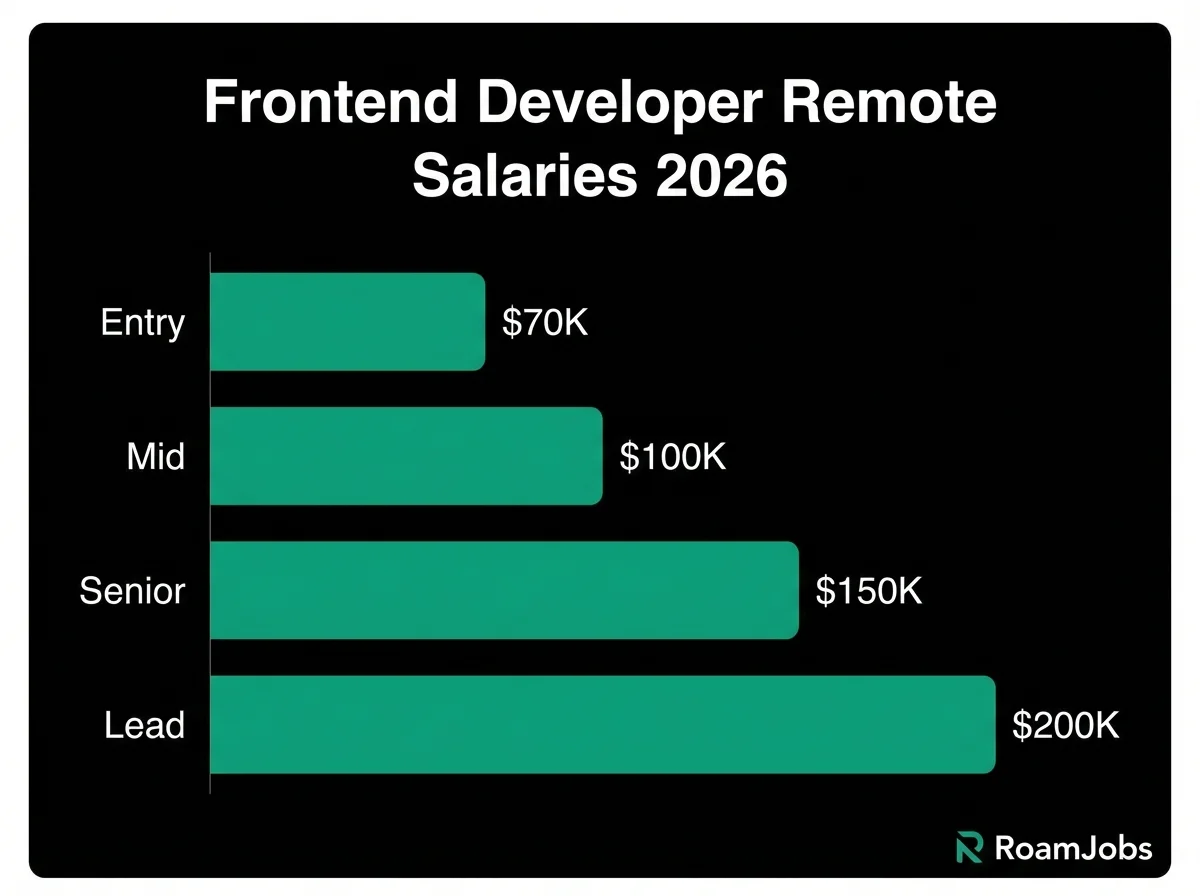
Remote frontend developers build the visual interfaces and user experiences that millions interact with daily, earning between $70,000 and $200,000+ depending on experience and location. This role combines technical programming skills with design sensibility, making it uniquely positioned at the intersection of engineering and user experience. To land a remote frontend position in 2026, you need strong proficiency in React, TypeScript, and CSS, demonstrated ability to collaborate asynchronously with designers and product teams, and a portfolio showcasing responsive, accessible, and performant web applications. The remote frontend market is highly competitive with 200-400 applicants per position, but demand remains exceptionally strong as companies continue building sophisticated web applications. Success requires mastering modern frontend frameworks, understanding performance optimization, and developing excellent written communication skills for distributed team collaboration.
Role Overview: What Remote Frontend Developers Actually Do
Frontend development has evolved dramatically from the days of simple HTML pages and jQuery scripts. Modern remote frontend developers architect complex client-side applications, implement sophisticated state management systems, optimize for performance across devices and networks, and collaborate closely with designers, backend engineers, and product managers to deliver exceptional user experiences.
Day-to-Day Responsibilities
As a remote frontend developer, your typical day involves a blend of coding, collaboration, and problem-solving that varies significantly by company size and team structure.
Core development work:
Building and maintaining user interfaces forms the foundation of frontend work. You translate designs from Figma, Sketch, or Adobe XD into functional components using frameworks like React, Vue, or Angular. This includes implementing responsive layouts that work across devices, adding interactivity and animations, handling form validation and user input, and connecting to backend APIs to display and manipulate data.
Code review and collaboration:
Remote frontend developers spend significant time reviewing teammates’ code, providing constructive feedback through pull request comments, and participating in asynchronous technical discussions. Code review in remote teams is more thorough and documentation-heavy than in-office environments since you cannot simply tap someone on the shoulder for a quick explanation.
Design collaboration:
Working closely with designers is essential for frontend roles. You provide technical feedback on design feasibility, suggest interaction patterns, and help bridge the gap between design vision and technical implementation. In remote settings, this collaboration happens through detailed Figma comments, Loom video recordings explaining technical constraints, and scheduled sync calls when complex decisions require real-time discussion.
Performance optimization:
Modern frontend developers obsess over performance metrics: Largest Contentful Paint, First Input Delay, Cumulative Layout Shift, and bundle sizes. You profile applications, identify bottlenecks, implement lazy loading, optimize images, and ensure applications feel fast across varying network conditions and device capabilities.
Testing and quality assurance:
Writing unit tests with Jest or Vitest, component tests with React Testing Library, and end-to-end tests with Cypress or Playwright is integral to the role. Remote teams rely heavily on automated testing since manual testing coordination across time zones is challenging.
Technical documentation:
Remote frontend developers document component APIs, architectural decisions, setup instructions, and coding conventions. Strong documentation enables teammates in different time zones to understand and work with your code without requiring synchronous communication.
Remote vs Office Differences for Frontend Work
Frontend development adapts exceptionally well to remote work, though certain aspects require intentional adjustment.
Advantages of remote frontend work:
Deep focus time proves easier to protect when working remotely. Complex CSS layouts, state management debugging, and performance optimization require extended concentration that office interruptions often break. Remote work lets you structure your day around when you do your best work.
Asynchronous design feedback works remarkably well. Tools like Figma enable detailed commenting, and recorded Loom videos explaining your implementation decisions communicate nuance better than hurried office conversations.
Testing across real devices becomes simpler when you can set up multiple browsers, phones, and tablets in your home workspace without worrying about office desk space or IT policies.
Challenges requiring adaptation:
Real-time design iteration is harder remotely. Sometimes you need to quickly explore multiple visual approaches with a designer, which synchronous in-person collaboration handles more fluidly. Successful remote frontend developers schedule regular sync sessions with designers and prepare visual options in advance.
Cross-functional alignment requires more explicit communication. In offices, you might overhear a product discussion that affects your implementation. Remote teams need structured channels and intentional information sharing to ensure frontend developers stay informed about context that affects their work.
Demonstrating visual work asynchronously takes practice. Screenshot annotations, screen recordings, and detailed PR descriptions with visual diffs replace the ease of pulling someone over to look at your screen.
Who Thrives in Remote Frontend Roles
Remote frontend development suits certain personality types and working styles particularly well.
Self-directed learners excel because frontend technologies evolve rapidly. New frameworks, build tools, and browser APIs emerge constantly, and you need intrinsic motivation to stay current without external pressure.
Visual thinkers with attention to detail succeed because frontend work requires noticing subtle spacing issues, color inconsistencies, and interaction edge cases that less visually oriented developers might miss.
Strong written communicators thrive since explaining why a particular CSS approach was chosen or how a complex state management flow works requires clear, thorough documentation.
People who enjoy variety appreciate that frontend work spans CSS styling, JavaScript logic, accessibility considerations, performance optimization, and cross-browser compatibility. Each day involves different types of challenges.
Those who value user impact find frontend satisfying because your work directly shapes what users see and interact with. Every interface improvement creates tangible value that you can observe and measure.
Seniority Breakdown: From Junior to Director
Understanding expectations at each career level helps you assess where you are, identify skill gaps, and plan your growth trajectory. Salary data represents US-based remote positions at technology companies.
Entry Level / Junior Frontend Developer
0-2 years experience
What Junior Frontend Developers Do
Entry-level frontend developers primarily implement well-defined features under guidance from more senior engineers. You receive detailed specifications and wireframes, then translate them into working code with regular code reviews and mentorship.
Typical responsibilities:
- Building UI components following established patterns and design systems
- Fixing bugs and addressing design feedback
- Writing unit tests for your code
- Participating in code reviews as both author and reviewer
- Learning team conventions, tools, and workflows
- Asking questions and seeking clarification proactively
Skills required at this level:
- Solid HTML and CSS fundamentals including flexbox and grid layouts
- JavaScript proficiency with ES6+ features
- Basic React, Vue, or Angular experience (one framework deeply)
- Git version control basics
- Understanding of responsive design principles
- Ability to read and implement designs from Figma or similar tools
- Basic debugging skills using browser developer tools
Common titles: Junior Frontend Developer, Frontend Developer I, Associate Frontend Engineer, Frontend Software Engineer (Entry Level)
How to Break Into Remote Frontend
Landing your first remote frontend role requires demonstrating readiness despite limited professional experience.
Build a portfolio that proves capability:
Create 3-5 polished projects deployed to production. Each project should demonstrate different skills: one might showcase complex CSS animations, another might implement a full React application with state management, and another might focus on accessibility. Include projects that solve real problems, not just tutorial recreations.
Contribute to open source:
Find beginner-friendly issues on frontend projects you use. Documentation improvements, bug fixes, and small feature additions demonstrate you can work in existing codebases with established conventions. This experience directly translates to joining a professional team.
Demonstrate remote readiness:
Junior candidates face extra scrutiny for remote roles since companies worry about whether you can work independently without constant guidance. Address this by showcasing strong written communication in your portfolio documentation, maintaining consistent GitHub activity, and preparing specific examples of self-directed learning and problem-solving.
Target remote-first companies:
Remote-first organizations have better infrastructure for mentoring junior engineers remotely. They have documentation, async communication norms, and onboarding processes designed for distributed work. Remote-friendly companies that primarily work in offices may struggle to support early-career remote employees effectively.
Consider hybrid stepping stones:
If remote-first companies seem out of reach, some junior developers start with hybrid positions at companies open to remote work after an initial onboarding period. This provides mentorship and relationship-building before transitioning fully remote.
Mid-Level Frontend Developer
2-5 years experience
What Mid-Level Frontend Developers Do
Mid-level frontend developers work independently on moderately complex features, make technical decisions within established architecture, and begin mentoring junior engineers. You take ownership of entire feature areas rather than individual tickets.
Typical responsibilities:
- Designing and implementing complete features end-to-end
- Making architectural decisions for medium-scope projects
- Reviewing junior engineers’ code and providing mentorship
- Collaborating directly with designers and product managers
- Identifying and advocating for technical improvements
- Writing comprehensive documentation for complex systems
- Debugging production issues and implementing fixes
- Contributing to team processes and standards
Skills expected at this level:
- Deep expertise in one major framework (React, Vue, or Angular)
- TypeScript proficiency
- Advanced CSS including animations, CSS-in-JS, and design systems
- State management patterns (Redux, Zustand, Pinia, etc.)
- Testing strategies including unit, integration, and E2E
- Performance optimization techniques
- Accessibility (WCAG) implementation experience
- API integration and data fetching patterns
- Build tools and bundler configuration basics
- Debugging complex issues across browser environments
Common titles: Frontend Developer, Frontend Engineer, Frontend Software Engineer, Software Engineer (Frontend), Web Developer
Expectations and Growth at Mid-Level
Mid-level represents the stage where you shift from executing specifications to shaping solutions. Companies expect you to identify problems, propose approaches, and implement them with minimal guidance.
Technical decision-making:
You make choices about component architecture, state management approaches, and library selection for features you own. These decisions should consider team conventions, long-term maintainability, and user experience. You document your reasoning for teammates and future developers.
Quality ownership:
Rather than relying on reviewers to catch issues, you ensure your code is well-tested, accessible, and performant before submitting for review. You run your code across browsers and devices, verify edge cases, and anticipate potential issues.
Proactive communication:
Mid-level remote developers communicate progress, blockers, and decisions proactively without waiting to be asked. You provide regular status updates, flag risks early, and keep stakeholders informed about changes to timelines or scope.
Mentorship beginnings:
Even without a formal mentor title, mid-level engineers answer junior teammates’ questions, pair on challenging problems, and help onboard new team members. This mentorship develops leadership skills and deepens your own understanding.
Senior Frontend Developer
5-8 years experience
What Senior Frontend Developers Do
Senior frontend developers lead technical direction for significant projects, mentor multiple engineers, make architecture decisions affecting the entire frontend codebase, and influence team practices and standards.
Typical responsibilities:
- Architecting major features and systems
- Setting technical direction for frontend teams
- Mentoring junior and mid-level engineers
- Leading technical interviews and hiring decisions
- Driving performance, accessibility, and quality initiatives
- Building and maintaining design systems and component libraries
- Making technology selection decisions
- Collaborating with engineering leadership on roadmap planning
- Handling ambiguous problems with minimal direction
- Communicating technical concepts to non-technical stakeholders
Skills expected at this level:
- Expert-level proficiency in primary framework and ecosystem
- Deep TypeScript knowledge including advanced patterns
- Performance optimization across the full frontend stack
- Architecture patterns for large-scale applications
- Design system development and governance
- Security best practices for client-side applications
- Testing strategy development and implementation
- Build pipeline optimization and tooling
- Cross-browser and cross-device expertise
- Strong understanding of backend concepts and API design
Common titles: Senior Frontend Developer, Senior Frontend Engineer, Staff Frontend Engineer, Frontend Architect, Senior Software Engineer (Frontend)
Senior-Level Expectations
Senior engineers operate with high autonomy and significant impact. Companies hire senior frontend developers expecting them to improve team capabilities, not just ship features.
Technical leadership:
You identify technical debt, advocate for addressing it, and lead initiatives to improve code quality. You make decisions about when to refactor, when to adopt new tools, and how to balance innovation with stability.
Mentorship and growth:
Senior developers actively develop teammates’ skills through code reviews, pair programming, knowledge sharing sessions, and 1:1 guidance. You help others grow without doing their work for them.
Cross-functional influence:
You work effectively with product, design, and backend teams to shape product direction. You push back on requirements that would create poor user experiences and propose alternatives that achieve business goals more effectively.
Handling ambiguity:
Senior developers thrive when handed vague requirements and open-ended problems. You clarify requirements, break down complex projects into actionable steps, and navigate uncertainty without constant direction.
Lead / Director Frontend Developer
8+ years experience
What Lead and Director-Level Frontend Developers Do
At the lead and director level, frontend developers shape strategy beyond individual projects. You influence hiring, define technical standards across teams, and make decisions that affect the entire organization’s frontend capabilities.
Typical responsibilities:
- Defining frontend architecture strategy across the organization
- Building and leading frontend teams
- Making build vs buy decisions for major capabilities
- Setting hiring standards and interviewing senior candidates
- Representing frontend interests in executive discussions
- Managing relationships with design and product leadership
- Defining and tracking technical quality metrics
- Planning multi-quarter technical initiatives
- Driving adoption of new technologies and practices
- Mentoring senior engineers toward leadership roles
Skills expected at this level:
- All senior-level technical skills plus strategic thinking
- Team building and organizational design
- Executive communication and influence
- Budget and resource planning
- Multi-team project coordination
- Vendor evaluation and management
- Technical due diligence for acquisitions
- Industry trend analysis and forecasting
- Conflict resolution and negotiation
- Long-term technical vision development
Common titles: Lead Frontend Developer, Principal Frontend Engineer, Frontend Architect, Director of Frontend Engineering, VP of Frontend, Head of Frontend
Leadership Responsibilities
At this level, your impact comes primarily through others. You succeed by building strong teams, setting clear direction, and creating environments where engineers do their best work.
Team building:
You hire effectively, identifying candidates who will excel in remote environments and contribute to team culture. You structure teams for effectiveness, balancing specialization with cross-training and considering time zones for collaboration.
Strategy and vision:
You develop multi-year technical visions for frontend at your organization, considering industry trends, business goals, and team capabilities. You communicate this vision compellingly to secure resources and alignment.
Stakeholder management:
You represent frontend engineering in discussions with executives, product leadership, and external partners. You translate technical concepts for non-technical audiences and advocate for investments in frontend quality.
Cultural leadership:
You shape team culture through the behaviors you model, the decisions you make, and the things you celebrate. You create psychologically safe environments where engineers take appropriate risks, learn from failures, and continuously improve.
Skills and Tools: What You Need to Know
The frontend landscape evolves rapidly, with new frameworks, build tools, and patterns emerging constantly. Understanding what to learn and when helps you invest your time effectively.
Framework Comparison
Choosing your primary framework is one of the most important career decisions for frontend developers. Each major option has distinct strengths and market dynamics.
Frontend Framework Comparison
Source: RoamJobs 2026 Frontend Developer Survey| Framework | Job Market | Learning Curve | Performance | Best For |
|---|---|---|---|---|
| React | Largest (60%) | Moderate | Good | Large apps, diverse ecosystem |
| Vue | Growing (15%) | Easiest | Excellent | Progressive enhancement |
| Angular | Strong (20%) | Steep | Good | Enterprise applications |
| Svelte | Small but growing | Easy | Best | Performance-critical apps |
| Solid | Emerging | Moderate | Excellent | React-like with better perf |
Data compiled from RoamJobs 2026 Frontend Developer Survey. Last verified January 2026.
React dominates the job market, accounting for roughly 60% of frontend positions. Its massive ecosystem, extensive documentation, and broad adoption mean plentiful job opportunities and readily available learning resources. The hooks-based functional paradigm and React Server Components represent the cutting edge of frontend architecture.
Vue offers the gentlest learning curve while providing full-featured framework capabilities. The composition API enables React-like patterns, while the options API provides familiarity for developers from other backgrounds. Vue’s job market is strongest in Asia and growing in Western markets.
Angular maintains strong enterprise adoption, particularly in financial services, healthcare, and large corporations. Its opinionated structure and TypeScript-first approach suit large teams that benefit from consistent patterns.
Svelte compiles components at build time, producing exceptionally small and fast applications. Job opportunities are limited but growing as performance-focused companies adopt it.
Build Tools and Bundlers
Modern frontend development relies heavily on build tooling that compiles, bundles, and optimizes code for production.
Build Tool Comparison
Source: State of JS 2025 Survey| Tool | Speed | Configuration | Ecosystem | Best Use Case |
|---|---|---|---|---|
| Vite | Fastest | Minimal | Growing | Modern development |
| webpack | Moderate | Complex | Largest | Complex enterprise apps |
| esbuild | Very Fast | Minimal | Small | Build pipelines, bundling |
| Turbopack | Very Fast | Minimal | New | Next.js projects |
| Parcel | Fast | Zero config | Moderate | Quick prototypes |
Data compiled from State of JS 2025 Survey. Last verified January 2026.
Vite has become the default choice for new projects, offering instant server start and lightning-fast hot module replacement through native ES modules. Most new React, Vue, and Svelte projects now use Vite.
webpack remains dominant in existing codebases despite slower builds. Understanding webpack configuration remains valuable since you will encounter it in legacy projects and complex enterprise applications.
Testing Tools
Quality assurance through automated testing is essential for professional frontend development.
Testing Framework Comparison
Source: Testing Tool Usage Survey 2025| Tool | Type | Speed | Use Case | Learning Curve |
|---|---|---|---|---|
| Vitest | Unit/Integration | Fastest | Vite projects | Easy |
| Jest | Unit/Integration | Fast | General purpose | Easy |
| React Testing Library | Component | Fast | React testing | Moderate |
| Cypress | E2E/Component | Moderate | User flow testing | Moderate |
| Playwright | E2E | Fast | Cross-browser E2E | Moderate |
Data compiled from Testing Tool Usage Survey 2025. Last verified January 2026.
Vitest pairs naturally with Vite projects, offering Jest-compatible APIs with dramatically faster execution. For new projects, Vitest is the default choice.
Playwright has emerged as the leading E2E testing framework, offering superior cross-browser support and more reliable tests than Cypress. Its auto-waiting mechanisms reduce flaky tests.
Required Skills by Seniority
Skills requirements compound as you advance. Each level assumes proficiency in everything from previous levels.
Junior (0-2 years) core skills:
- HTML semantics and accessibility fundamentals
- CSS including flexbox, grid, responsive design, and basic animations
- JavaScript ES6+ features: arrow functions, destructuring, modules, async/await
- One framework (React recommended) at basic level
- Git fundamentals: commits, branches, pull requests
- Browser developer tools for debugging
- NPM/Yarn package management
- Basic understanding of HTTP and REST APIs
Mid-level (2-5 years) additions:
- TypeScript proficiency including generics and utility types
- Advanced React patterns: hooks, context, custom hooks, render optimization
- State management with Redux, Zustand, or similar
- Testing with Jest/Vitest and React Testing Library
- CSS-in-JS or Tailwind CSS
- Performance profiling and optimization
- Accessibility (WCAG) implementation
- API design understanding and data fetching patterns
- Build tool configuration basics
Senior (5-8 years) additions:
- Architecture patterns for large applications
- Design system development and component library creation
- Advanced TypeScript including type-level programming
- Performance optimization across the full stack
- Security best practices for client-side applications
- Mentorship and code review leadership
- Cross-browser debugging at expert level
- Build pipeline optimization
- Monitoring and observability for frontend applications
Lead/Director (8+ years) additions:
- Technical strategy and roadmap development
- Team building and organizational design
- Stakeholder management and executive communication
- Technology evaluation and vendor management
- Multi-team coordination and dependency management
- Technical due diligence
- Industry trend analysis
Certifications Worth Getting
Unlike some engineering fields, frontend development does not require or typically value certifications heavily. However, certain credentials can demonstrate commitment and knowledge:
AWS Certified Cloud Practitioner demonstrates understanding of cloud deployment, valuable as frontend moves toward serverless and edge deployments.
Google UX Design Professional Certificate complements frontend skills by deepening design understanding, useful for developers who want to work more closely with design teams.
Accessibility certifications like IAAP CPACC show commitment to inclusive design, increasingly important as companies face accessibility requirements.
Framework-specific certifications from vendors like Vue School or have limited value since practical portfolio work demonstrates skill more effectively.
Learning Path Recommendations
For career changers entering frontend:
- Master HTML, CSS, and JavaScript fundamentals (3-4 months)
- Learn React deeply through building projects (3-4 months)
- Add TypeScript to your toolkit (1-2 months)
- Build 3-5 portfolio projects demonstrating range (2-3 months)
- Learn testing and professional workflows (1-2 months)
- Contribute to open source and network (ongoing)
For junior developers advancing to mid-level:
- Deepen React expertise including advanced patterns
- Master TypeScript including generics
- Learn comprehensive testing strategies
- Study performance optimization techniques
- Build and maintain a complex personal project
- Seek mentorship and stretch assignments
For mid-level developers advancing to senior:
- Study system design and architecture patterns
- Lead a significant project end-to-end
- Develop mentorship skills through teaching
- Contribute to technical decision-making
- Build expertise in performance and accessibility
- Expand influence beyond your immediate team
Companies Hiring Remote Frontend Developers
Targeting the right companies dramatically improves your chances of landing a remote frontend role. These companies actively hire remote frontend developers with varying experience levels.
Remote-First Companies
These organizations built their entire cultures around distributed work, with infrastructure, processes, and norms designed for remote collaboration.
Vercel - Creators of Next.js and the frontend cloud platform. Fully distributed team with strong emphasis on frontend excellence. Hires primarily senior engineers with deep React and Next.js experience. Competitive compensation with location-agnostic pay for senior roles.
Netlify - Jamstack platform pioneer with remote-first culture since founding. Frontend positions span their dashboard, documentation, and developer tools. Strong engineering culture with emphasis on developer experience.
GitLab - Fully remote company with 2,500+ employees. Frontend work primarily involves Vue.js. Exceptional documentation culture with publicly available handbook. Hires across experience levels.
Automattic (WordPress, WooCommerce, Tumblr, Day One) - A pioneer of fully distributed work with a workforce spread across dozens of countries. Frontend work spans multiple products with different tech stacks. Strong async culture with annual team meetups. Offers home office setup budgets and coworking allowances.
Zapier - Workflow automation platform with a fully remote, distributed team. React-based frontend with emphasis on accessibility and user experience. Known for excellent work-life balance and async-first communication.
Buffer - Social media management platform with transparent salary policies and strong remote culture. Smaller engineering team focused on React development. Emphasis on sustainable work practices.
Doist (Todoist, Twist) - Distributed team across 32 countries building productivity tools. Frontend work uses modern JavaScript with focus on performance across devices. Strong emphasis on async communication through their own Twist tool.
Linear - Issue tracking tool built by a distributed team. Frontend positions focus on building an exceptionally polished, fast user interface. High bar for design sensibility and performance optimization.
Remote-Friendly Tech Companies
These companies offer remote positions while maintaining some office presence.
Shopify - E-commerce platform that went “digital by default.” Large frontend team working on merchant dashboard, checkout, and storefront themes. React-based stack with focus on performance at scale.
Stripe - Financial infrastructure with remote-first engineering. Frontend work spans dashboard, documentation, and developer tools. Exceptional engineering culture with high technical bar.
Figma - Design tool with distributed engineering team. Frontend work involves complex canvas rendering and collaborative features. Strong intersection of design and engineering.
Notion - Productivity workspace with growing remote presence. Frontend challenges include rich text editing and real-time collaboration. High emphasis on polish and user experience.
Webflow - Visual web development platform with remote-friendly culture. Frontend work involves complex visual editors and site rendering. Unique challenges at intersection of design tools and web development.
HubSpot - CRM platform with @flex work arrangements. Large frontend team with opportunities across their product suite. Strong engineering culture with good career growth.
Atlassian - Makers of Jira and Confluence with “Team Anywhere” policy. Frontend work spans multiple products with significant complexity. Enterprise-scale challenges with good compensation.
Startups Hiring Remote Frontend
Startups offer equity upside, outsized impact, and faster career growth with corresponding risk.
Supabase - Open-source Firebase alternative with fully remote team. Frontend work on dashboard and documentation. Building in the open with strong community focus.
Cal.com - Open-source scheduling platform with distributed team. Frontend work involves complex calendar interfaces and integrations.
PostHog - Product analytics platform with transparent, remote culture. Frontend work on dashboards, visualizations, and developer tools.
Resend - Email platform for developers with distributed team. Focus on exceptional developer experience and clean interfaces.
Railway - Cloud platform with remote-first team. Frontend work spans deployment dashboard and developer tools.
Retool - Internal tools builder with growing remote presence. Complex frontend challenges involving low-code visual building.
How to Find Unlisted Opportunities
Many remote frontend positions are filled before they’re publicly posted.
Network in developer communities:
Active participation in React, Vue, or general frontend communities on Discord, Twitter, and Reddit surfaces opportunities before public posting. Many hiring managers post in community channels first.
Follow company engineering blogs:
Companies often hint at hiring needs through engineering blog posts about new projects or technical challenges. Reaching out when a company writes about expanding capabilities can catch them before formal job postings.
Connect with recruiters specializing in remote:
Technical recruiters focused on remote positions maintain relationships with companies before roles open. Building relationships with 2-3 remote-focused recruiters keeps you informed about emerging opportunities.
Contribute to open source:
Maintainers of popular open source projects receive hiring inquiries. Contributing to tools companies use creates visibility and relationships that lead to opportunities.
Monitor funding announcements:
Companies that recently raised funding typically hire heavily. Following funding news and reaching out proactively can access positions before job boards.
Interview Deep Dive
Remote frontend interviews evaluate both technical capability and remote work readiness. Prepare for comprehensive assessment across multiple dimensions.
Technical Interview Questions
The virtual DOM is a lightweight JavaScript representation of the actual DOM. When state changes in a React component, React creates a new virtual DOM tree and compares it with the previous one through a process called reconciliation or “diffing.”
React’s diffing algorithm compares elements by type and key. If an element’s type changes (div to span), React destroys the old tree and builds a new one. For same-type elements, React updates only the changed attributes. Keys help React identify which items in lists have changed, enabling efficient updates without re-rendering unchanged items.
After diffing, React calculates the minimal set of actual DOM operations needed and batches them for performance. This batching and minimal update strategy makes React efficient for complex UIs with frequent state changes.
In practice, this means you should use stable keys for lists (never index for dynamic lists), keep component trees shallow when possible, and use React.memo or useMemo to prevent unnecessary re-renders when components receive the same props.
Layout thrashing occurs when JavaScript repeatedly reads from and writes to the DOM in ways that force the browser to recalculate layout (reflow) multiple times within a single frame. Since reflow is expensive, this causes performance problems and jank.
For example, reading offsetHeight then setting style.height in a loop forces the browser to reflow on each iteration to provide the accurate measurement. The browser cannot batch these operations.
Prevention strategies include batching reads and writes separately. Read all DOM measurements first, store them, then perform all writes. Modern frameworks like React help by batching DOM updates automatically.
For manual DOM manipulation, use requestAnimationFrame to batch operations into single frames. The fastdom library provides a convenient API for read/write batching.
CSS transforms and opacity changes avoid layout entirely, triggering only compositing. When possible, animate these properties instead of width, height, or position.
The browser’s Performance tab shows layout events. If you see many clustered layout events, investigate the JavaScript triggering them.
Effective infinite scroll requires virtualization, efficient intersection detection, and proper loading state management.
For virtualization, render only visible items plus a small buffer. Libraries like react-virtual or react-window calculate which items are visible based on scroll position and container size, maintaining consistent performance regardless of total item count.
Use Intersection Observer API rather than scroll event listeners. Create an observer watching a sentinel element at the end of your list. When it enters the viewport, trigger the next page load. This is more performant than calculating scroll positions on every scroll event.
Implement loading states that prevent duplicate requests. Track whether a request is pending and don’t trigger new loads until the current one completes. Show loading indicators while fetching.
Consider memory management for extremely long lists. Implement a maximum rendered item count and clean up oldest items as new ones load to prevent memory bloat.
Handle edge cases like fast scrolling (users jumping far ahead), network errors (retry mechanisms with exponential backoff), and reaching the end of available data (showing an end state).
The CSS box model describes how elements are sized and spaced. From inside out: content, padding, border, and margin.
By default (content-box), width and height set only the content area. Padding and border add to the total element size. A 100px-wide element with 20px padding and 2px border actually takes 144px total width.
With box-sizing: border-box, width and height include content, padding, and border. The same 100px width with padding and border means the content area shrinks to accommodate, keeping total width at 100px.
Most modern CSS resets set box-sizing: border-box on all elements because it makes layout calculations more intuitive. You set the total space an element occupies, and padding/border work within that space.
Margin always remains outside both box-sizing models and can collapse vertically between adjacent elements.
React Server Components (RSC) are components that render exclusively on the server, never shipping JavaScript to the client. They can directly access backend resources like databases and APIs, with their output streamed as HTML to the client.
RSC are ideal for data-fetching components that don’t need interactivity. A product listing page might fetch data and render HTML entirely on the server, sending no JavaScript for that component. The initial page load is faster and the bundle smaller.
Client Components (marked with ‘use client’) handle interactivity, state, effects, and browser APIs. You can nest Client Components within Server Components, but not vice versa.
Use RSC for static content, data fetching, and anything that doesn’t need client-side JavaScript. Use Client Components for forms, event handlers, useState, useEffect, and browser APIs.
In Next.js 13+, components are Server Components by default. This changes mental models around data fetching, since you can await directly in components and access server-only resources without API routes.
The boundary between RSC and Client Components requires careful consideration. Props passed from Server to Client Components must be serializable, and you cannot pass functions or classes across this boundary.
Accessibility requires attention throughout development, not as an afterthought.
Start with semantic HTML. Use appropriate elements (button for actions, a for navigation, proper heading hierarchy). Semantic elements provide built-in accessibility that divs with click handlers lack.
Ensure keyboard navigation works completely. All interactive elements must be focusable and operable with keyboard. Focus order should follow visual order. Provide visible focus indicators (don’t just remove outlines).
Use ARIA attributes when semantic HTML is insufficient. Labels describe elements, roles override semantic meaning when needed, and live regions announce dynamic content to screen readers. However, misused ARIA causes more problems than no ARIA.
Maintain sufficient color contrast (4.5:1 for normal text, 3:1 for large text). Don’t convey information through color alone. Provide text alternatives for images with alt attributes.
Test with screen readers (NVDA, VoiceOver), keyboard-only navigation, and automated tools like axe or Lighthouse. Automated tools catch only 30-40% of issues; manual testing is essential.
Include accessibility in code review checklists. Train the team on common patterns. Consider hiring users with disabilities for testing.
A closure is a function that remembers the environment in which it was created, accessing variables from that outer scope even after the outer function has returned.
In JavaScript, every function forms a closure. The function retains access to variables from its lexical scope, not where it’s called.
In React, closures appear constantly with hooks. When you use useState, the setter function closes over the component scope. With useEffect, the effect function closes over the values at the time of render.
A practical example: a debounced search input. The debounce function returns a new function that closes over a timeout ID variable. Each call clears the previous timeout and sets a new one. The inner function maintains reference to the timeout ID across calls.
A common pitfall is stale closures in useEffect. If you reference state inside an effect but don’t include it in the dependency array, the effect closes over the initial value and never sees updates. The solution is including all referenced values in dependencies or using useRef for values you want to access without triggering re-runs.
Begin with measurement before optimization. Use React DevTools Profiler to identify which components re-render frequently and why. Chrome Performance tab shows long tasks and layout work.
Eliminate unnecessary re-renders first. Use React.memo for components receiving stable props. Ensure props are referentially stable with useMemo for objects/arrays and useCallback for functions. Move state closer to where it’s used rather than lifting everything to the top.
Optimize expensive computations with useMemo. If a component does heavy calculations, memoize the result and only recalculate when dependencies change.
Implement code splitting with React.lazy and Suspense. Split by route at minimum, but consider splitting heavy components or features that users might not access.
Virtualize long lists using react-virtual or similar. Rendering thousands of DOM nodes hurts performance even if React’s diffing is efficient.
Optimize images with modern formats (WebP, AVIF), lazy loading, and proper sizing. Large images are often the biggest performance bottleneck.
For state management, ensure you’re selecting minimal state from stores rather than entire state objects. This prevents unnecessary re-renders when unrelated state changes.
Consider moving expensive work to Web Workers for CPU-intensive operations that block the main thread.
System Design Questions
A design system for a medium company requires balancing consistency with flexibility while enabling efficient development.
Start with design tokens: colors, typography, spacing, shadows, and breakpoints as CSS custom properties or JavaScript objects. These foundational values ensure visual consistency and enable theming.
Build primitive components first: Button, Input, Text, Box, Flex, Grid. These handle accessibility, basic states, and prop APIs that higher-level components inherit. Use composition over configuration.
Layer composed components on primitives: Card, Modal, Dropdown, Toast. These implement common patterns but remain customizable through props and slots.
For styling, consider tradeoffs between CSS-in-JS (co-located styles, dynamic theming) and utility-first CSS (smaller bundles, faster development). Tailwind with a component library abstraction works well at this scale.
Documentation is essential. Use Storybook for interactive documentation, showing all component states, props, and examples. Include accessibility notes and usage guidelines.
Version with semantic versioning. Breaking changes to component APIs require major versions. Provide migration guides for breaking changes.
For distribution, publish as an npm package with tree-shaking support. Consider a monorepo structure separating core primitives, composed components, and documentation.
Testing includes visual regression testing (Chromatic), unit tests for logic, and accessibility audits in CI.
A collaborative editor requires handling concurrent edits, real-time sync, conflict resolution, and offline support.
For conflict resolution, use CRDTs (Conflict-free Replicated Data Types) or Operational Transformation. CRDTs like Yjs or Automerge enable peer-to-peer sync with guaranteed eventual consistency. Each character or operation has a unique ID enabling merges without central coordination.
The architecture layers include: document model (CRDT data structure), editor component (rendering and user input), sync layer (WebSocket connection), and persistence layer (local and server storage).
WebSocket connection maintains real-time sync. On edit, generate operations, apply locally (optimistic), broadcast to server, which relays to other clients. Yjs handles operation transformation and conflict resolution.
Implement presence awareness showing cursor positions and selections of other users. Presence data syncs through WebSocket but requires less consistency than document data.
For the editor component, consider ProseMirror or TipTap which support collaborative editing plugins. These handle selection, formatting, and complex content types while providing hooks for CRDT integration.
Offline support caches operations locally when disconnected. On reconnection, sync catches up through operation replay. The CRDT ensures operations apply correctly regardless of order received.
Performance considerations include throttling presence updates, using virtualization for long documents, and lazy loading document sections.
Behavioral Questions
Strong answers demonstrate structured decision-making, stakeholder communication, and learning from outcomes.
Describe the situation briefly: what decision, what stakes, what information was missing. For frontend roles, this might involve framework selection, architecture patterns, or build tooling decisions.
Explain your process: how you gathered available information, who you consulted, what alternatives you considered. Show that you balance analysis with pragmatism rather than paralysis.
Discuss how you communicated uncertainty to stakeholders. Remote work requires explicit communication about risks and tradeoffs.
Share the outcome and what you learned. If the decision proved wrong, explain how you recognized it and adapted. Good judgment comes from learning from bad judgment.
Example structure: “We needed to choose a state management approach for a new application but lacked performance data for our specific use case. I created small prototypes with Redux and Zustand, documented tradeoffs in our team wiki, and recommended Zustand based on our team’s experience and the application’s complexity. I noted that we might revisit if performance issues emerged. Six months later, the decision has held up, though we’ve adapted patterns based on what we learned.”
This question assesses collaboration skills crucial for frontend developers who work closely with design teams.
Show respect for design expertise while explaining technical constraints clearly. Frame disagreements as collaborative problem-solving rather than conflict.
Discuss specific examples of finding creative solutions that honored design intent while addressing technical limitations. Perhaps you found a CSS approach that achieved the visual effect differently, or proposed an alternative interaction pattern that was technically feasible while improving user experience.
Explain your communication approach for remote collaboration: detailed Figma comments, Loom recordings demonstrating technical constraints, or scheduled sync calls for complex discussions.
Demonstrate that you understand design priorities (visual consistency, user experience, brand expression) and can propose alternatives that respect those priorities even when the exact specification isn’t feasible.
Mention proactive communication: bringing up technical constraints early in the design process rather than surprising designers during implementation.
Show intentional learning strategies that balance depth with breadth.
Discuss specific sources: newsletters (JavaScript Weekly, React Status), blogs (Kent C. Dodds, Josh Comeau), conferences (React Conf, VueConf), and official documentation for tools you use.
Explain how you filter signal from noise. You cannot learn everything, so describe how you evaluate what’s worth learning versus what to watch from a distance.
Mention hands-on learning: building side projects with new tools, contributing to open source, or experimenting in sandboxes before applying at work.
Discuss knowledge sharing: writing blog posts, giving team presentations, or mentoring others as ways to deepen your own understanding.
Show pragmatism: you stay informed about new tools but don’t chase every trend. You evaluate new technologies against real needs rather than resume-driven development.
Remote Work Questions
Remote relationship building requires more intentionality than office relationships that develop through proximity.
Discuss specific strategies: virtual coffee chats, asking about people’s lives beyond work, remembering details they share, and participating in team social activities even when they feel awkward.
Explain how you create presence: camera on in meetings when appropriate, responding promptly to messages, and being available during overlapping hours.
Mention asynchronous relationship building: thoughtful code review comments that teach rather than criticize, celebrating teammates’ achievements publicly, and asking good questions that show genuine interest in their work.
Discuss how you handle time zone differences: finding overlap windows for real-time connection, being considerate of others’ working hours, and building rapport through async channels when sync isn’t possible.
Share specific examples of remote relationships you’ve built and how they’ve benefited collaboration.
Demonstrate self-management maturity and specific practices that work for you.
Describe your workspace setup and how it enables focus. Discuss boundary-setting between work and personal time.
Explain your daily structure: how you plan your day, manage energy levels, and handle competing priorities. Show awareness of your productive hours and how you protect them for complex work.
Discuss tools and techniques: time blocking, task management systems, the Pomodoro technique, or whatever works for you. Be specific rather than generic.
Mention how you handle distractions and maintain discipline. Be honest about challenges and how you address them.
Explain how you communicate productivity without micromanagement: regular status updates, clear task tracking, and proactive communication about progress and blockers.
This assesses self-sufficiency and async communication skills essential for distributed teams.
Explain your unblocking hierarchy: what you try before asking for help (documentation, code exploration, experimenting), how you document your attempts, and when you decide to ask.
Discuss how you structure questions for async resolution: providing full context, explaining what you’ve tried, including relevant code/screenshots, and being specific about what you need.
Mention how you plan work around dependencies. If you know you’ll need input from someone in a different time zone, you start early and communicate ahead rather than waiting until you’re blocked.
Describe how you make progress on other work while waiting. Having multiple tasks at different stages helps you stay productive when one is blocked.
Show that you balance self-sufficiency with appropriate help-seeking. Neither spinning for hours on something a quick question would solve nor escalating every minor obstacle demonstrates good judgment.
Show you take remote work seriously as a professional commitment, not just working from the couch.
Describe your physical setup: dedicated workspace, ergonomic considerations, quality audio/video equipment for meetings.
Discuss your internet reliability: backup options if primary connection fails, mobile hotspot availability, and any steps you take for reliable connectivity.
Explain how you minimize background distractions: household coordination, soundproofing considerations, and professional meeting environments.
Mention any investments you’ve made in your setup and how they’ve improved your effectiveness.
Be honest about limitations while showing you’ve thought through mitigation. Having roommates or children doesn’t disqualify you; showing awareness and accommodation does.
What Hiring Managers Look For
Beyond technical skills, hiring managers evaluate several key factors when assessing remote frontend candidates.
Communication quality:
Your written communication during the interview process predicts your remote work effectiveness. Hiring managers note the clarity of your emails, the structure of your interview answers, and how you explain technical concepts. Rambling, unclear, or poorly organized communication is a red flag.
Self-awareness:
Candidates who accurately assess their strengths and weaknesses, acknowledge what they don’t know, and learn from past mistakes demonstrate maturity. Overconfidence or inability to accept feedback suggests difficulty working independently without constant validation.
Cultural contribution:
Remote teams need people who actively contribute to team culture despite distance. Hiring managers look for candidates who ask thoughtful questions about team dynamics, express interest in teammates, and seem genuinely collaborative rather than transactional.
Problem-solving approach:
How you tackle problems matters as much as whether you solve them. Hiring managers observe whether you clarify requirements, break down problems systematically, communicate your thinking, and consider tradeoffs. These behaviors predict success in remote work where you often work through ambiguity independently.
Genuine interest:
Candidates who have researched the company, ask specific questions about the product and technology, and can articulate why this role interests them stand out from those who seem to be mass-applying. Remote hiring is expensive; companies want candidates committed to this specific opportunity.
Frequently Asked Questions
How do I find remote frontend developer jobs?
To find remote frontend developer jobs, start with specialized job boards like We Work Remotely, Remote OK, and FlexJobs that focus on remote positions. Set up job alerts with keywords like "remote frontend developer" and filter by fully remote positions. Network on LinkedIn by following remote-friendly companies and engaging with hiring managers. Many frontend developer roles are posted on company career pages directly, so identify target companies known for remote work and check their openings regularly.
What skills do I need for remote frontend developer positions?
Remote frontend developer positions typically require the same technical skills as on-site roles, plus strong remote work competencies. Essential remote skills include excellent written communication, self-motivation, time management, and proficiency with collaboration tools like Slack, Zoom, and project management software. Demonstrating previous remote work experience or the ability to work independently is highly valued by employers hiring for remote frontend developer roles.
What salary can I expect as a remote frontend developer?
Remote frontend developer salaries vary based on experience level, company size, location-based pay policies, and the specific tech stack or skills required. US-based remote positions typically pay market rates regardless of where you live, while some companies adjust pay based on your location's cost of living. Entry-level positions start lower, while senior roles can command premium salaries. Check our salary guides for specific ranges by experience level and geography.
Are remote frontend developer jobs entry-level friendly?
Some remote frontend developer jobs are entry-level friendly, though competition can be high. Focus on building a strong portfolio or demonstrable skills, contributing to open source projects if applicable, and gaining any relevant experience through internships, freelance work, or personal projects. Some companies specifically hire remote junior talent and provide mentorship programs. Smaller startups and agencies may be more open to entry-level remote hires than large corporations.
Should I learn React, Vue, or Angular for the best remote job prospects?
React offers the largest job market with approximately 60% of frontend positions requiring it, making it the safest choice for career flexibility. Vue is growing, particularly popular in Asia and with teams that value simpler syntax, but has fewer positions overall. Angular maintains strong enterprise adoption, especially in financial services and healthcare, offering good compensation but a narrower market. For maximum job prospects, learn React deeply first. Once employed, you can add other frameworks. Companies hiring React developers typically have larger teams with more positions. However, if you're targeting a specific company that uses Vue or Angular, learn their stack. The best framework is the one that gets you the job you want.
Is TypeScript required for remote frontend positions in 2026?
TypeScript has become effectively mandatory for professional frontend development. The vast majority of remote frontend job postings now require or strongly prefer TypeScript experience. The type safety, improved IDE support, and self-documenting nature of TypeScript code make it especially valuable for remote teams where you cannot simply ask a nearby colleague what a function expects. If you're currently JavaScript-only, prioritize learning TypeScript immediately. Start with basic types, then gradually learn generics, utility types, and more advanced patterns. Most React codebases now use TypeScript, and Vue 3 was rewritten in TypeScript with excellent support. The investment in learning TypeScript returns quickly through fewer bugs and improved developer experience.
Do I need design skills to be a remote frontend developer?
You don't need to be a designer, but you need design literacy. Successful frontend developers understand visual principles (spacing, typography, color, hierarchy), can interpret design files accurately, provide useful feedback on design feasibility, and fill in gaps when designs don't specify every state or edge case. Remote frontend work requires more design judgment than office work because you cannot constantly consult designers for minor decisions. You should recognize when spacing looks 'off,' understand why certain interactions feel good, and implement designs with attention to details designers care about. Take a basic design course, study design systems, and develop your eye by consciously analyzing interfaces you use. You don't need to create designs, but you need to understand and implement them well.
What should my frontend portfolio include to land a remote job?
Your portfolio should include 3-5 deployed projects demonstrating range and depth. Include at least one complex React application with state management, API integration, and proper testing. Show CSS proficiency through a project with sophisticated styling, animations, or a responsive design challenge. Include one project emphasizing performance or accessibility to demonstrate depth beyond basic functionality. Each project needs: live deployment, clean documented source code on GitHub, clear README explaining the problem solved and technical decisions made, and evidence of testing. Avoid tutorial recreations; build projects that solve real problems, even small ones. Quality matters more than quantity. Three excellent projects beat ten mediocre ones. Update projects regularly to show continued growth and modern practices.
What are the biggest challenges specific to remote frontend development?
Remote frontend work presents several unique challenges. Design collaboration is harder when you cannot quickly sketch together or look at the same screen. Successful remote frontend developers over-communicate through detailed Figma comments and screen recordings. Cross-browser testing requires more personal device setup rather than relying on shared office resources. You need your own collection of test devices or good familiarity with cloud testing services. Time zone gaps with designers can slow iteration cycles, requiring more autonomous design decisions and thorough documentation of questions. Code review turnaround takes longer async, so you need to context-switch effectively between work items rather than waiting for reviews. Demonstrating visual work requires more effort: annotated screenshots, video recordings, and detailed PR descriptions replace walking someone to your desk. Build these practices proactively rather than struggling with communication gaps.
How competitive are remote frontend developer positions?
Remote frontend positions are highly competitive, typically receiving 200-400 applications per posting. The combination of remote flexibility and strong demand makes these roles attractive to a global talent pool. However, competition varies significantly by seniority and company. Junior remote positions are extremely competitive because many companies are reluctant to hire entry-level remotely. Mid-level and senior positions have better odds, especially at remote-first companies with strong async cultures. Companies hiring from specific regions have less competition than those open to anywhere globally. To improve your odds: target companies specifically rather than mass-applying, build genuine connections through networking, contribute to open source projects companies use, and apply to positions where your specific experience matches closely. Quality applications to 50 targeted companies beat generic applications to 500.
Can I transition from backend to remote frontend development?
Backend-to-frontend transitions are common and valued. Your backend experience provides advantages: understanding APIs, database modeling, authentication, and system architecture inform frontend decisions about data fetching, caching, and application structure. To transition, focus on learning CSS deeply (often the biggest gap for backend developers), mastering one frontend framework thoroughly, and building visible projects demonstrating your new skills. Start with projects that emphasize your strengths: perhaps a data visualization dashboard leveraging your data understanding, or an admin tool showcasing complex form handling. Expect to take some salary reduction initially or target fullstack roles as a bridge. Within 1-2 years of focused learning and experience, you can reach equivalent seniority as a frontend specialist. Your backend knowledge becomes increasingly valuable as you grow senior and need to make architectural decisions spanning the full stack.
How important is open source contribution for remote frontend jobs?
Open source contribution is valuable but not required for most positions. It demonstrates you can work in existing codebases with established conventions, collaborate asynchronously with strangers, write code others can understand, and follow contribution processes. For junior developers without professional experience, open source contributions provide evidence of these abilities. For experienced developers, it's a bonus that shows community engagement. If you contribute, quality matters more than quantity. Thoughtful contributions to established projects carry more weight than creating personal projects no one uses. Contributing to tools you actually use makes the experience more natural. Documentation improvements and bug fixes are valid contributions, not just features. However, don't force open source if it doesn't interest you. Strong portfolio projects, a technical blog, or other forms of visible work can substitute. Companies want evidence of your abilities; open source is one way to provide it, not the only way.
What's the typical interview timeline for remote frontend positions?
Remote frontend interviews typically span 4-8 weeks with 5-8 rounds. A typical process includes: recruiter screen (30 min, week 1), technical phone screen with coding (60 min, week 2), take-home project (2-6 hours work, 1 week deadline, week 2-3), take-home review and follow-up technical discussion (60-90 min, week 4), system design interview for mid+ levels (60 min, week 5), behavioral/culture interviews (2-3 rounds, 45-60 min each, weeks 5-6), hiring manager interview (60 min, week 6-7), and final/executive interview (30-60 min, week 7-8). Timeline varies by company size and process efficiency. Startups often move faster (3-4 weeks); large companies may take longer. Remote interviews happen via video call; ensure your setup is professional with good audio, lighting, and reliable internet. The extended timeline requires tracking multiple opportunities simultaneously rather than waiting for one to conclude before starting others.
Should I accept a lower salary for a remote frontend position?
Generally, you should not accept significantly lower salary for remote positions in 2026. Remote work is standard in frontend development, not a perk worth paying for. Many remote-first companies offer competitive or premium compensation to attract global talent. However, legitimate salary variation exists. Location-based companies adjust pay by cost of living; a lower nominal salary might represent equal purchasing power. Early-stage startups might offer lower salary with significant equity. Companies hiring from lower-cost regions may offer less than US market rates while remaining competitive locally. Evaluate total compensation (salary, equity, benefits, perks) and consider factors like work-life balance, learning opportunities, and career growth. A slightly lower salary at a company that invests in your development might accelerate your career more than maximum pay at a stagnant role. But don't undervalue yourself; remote frontend developers are in high demand. Know market rates and negotiate accordingly.
How do remote frontend developers handle design handoff and collaboration?
Remote design collaboration requires intentional processes and tools. Most teams use Figma for design files with built-in commenting for async feedback. Establish clear handoff processes: designers mark components as ready for development, include specifications for spacing, colors, and interactions, and note which states are designed versus need developer judgment. Use inspection tools in Figma to extract exact values rather than eyeballing. Set up component libraries mirroring design systems so designs and code stay synchronized. Schedule regular sync time with designers, especially for complex features. Use Loom to record walkthroughs of implemented features for async review. Create a shared vocabulary for design elements so communication is precise. Document patterns for states designs don't explicitly show (loading, error, empty). The overhead of explicit documentation pays off in fewer revision cycles and better results. Over time, you develop shared understanding that reduces coordination needs.
What certifications help land remote frontend developer jobs?
Certifications have minimal impact on frontend hiring compared to portfolio work and demonstrable skills. No certification substitutes for proven ability to build quality frontend applications. That said, certain certifications can supplement your profile. AWS Certified Cloud Practitioner demonstrates understanding of cloud deployment, relevant as frontend increasingly involves edge computing and serverless. Meta's Frontend Developer Professional Certificate or similar bootcamp certifications help career changers demonstrate commitment, though they don't replace portfolio projects. Accessibility certifications (IAAP CPACC, WAS) show commitment to inclusive development, increasingly important as companies face accessibility requirements. Framework-specific certifications from course platforms have limited value; time is better spent building projects. If you pursue certifications, do so for learning, not primarily for resume impact. The frontend industry evaluates practical skills through portfolios, coding challenges, and technical discussions, not credentials.
Related Guides and Resources
Now that you understand the remote frontend developer landscape, continue your preparation with these related resources.
If you’re ready to apply:
Start with our comprehensive Remote Interview Guide covering video interview best practices, take-home project strategies, and behavioral interview preparation specific to remote positions.
If you want to understand the broader engineering market:
Explore Remote Engineering Jobs: The Complete Guide for an overview of all engineering specializations including backend, DevOps, and machine learning. This helps you understand how frontend fits into the broader engineering landscape and potential career transitions.
If you’re considering fullstack:
Many frontend developers expand into fullstack roles. Our Remote Fullstack Developer Jobs guide covers what additional skills you need and how the role differs from frontend specialization.
If you’re negotiating an offer:
Once you receive an offer, consult our Negotiating Remote Salary guide for strategies specific to remote compensation discussions, including how to handle location-based pay and equity packages.
If you want to find opportunities:
Our Where to Find Remote Jobs guide covers job boards, networking strategies, and direct outreach approaches optimized for frontend developers.
Continuing Your Learning
The frontend ecosystem evolves constantly. Stay current by following these resources:
Essential newsletters: JavaScript Weekly, React Status, Frontend Focus, and CSS-Tricks deliver curated industry news to your inbox.
Deep learning: Josh Comeau’s CSS blog, Kent C. Dodds’ React patterns, and Dan Abramov’s writing provide expert perspectives that deepen your understanding.
Community engagement: Reactiflux Discord, the Vue community, and frontend-focused Twitter accounts keep you connected to industry conversations and emerging practices.
Hands-on practice: Build side projects exploring new tools, contribute to open source, and experiment with technologies before you need them professionally.
Your remote frontend career is a continuous learning journey. The fundamentals you build now compound over time into expertise that opens doors to senior roles, leadership positions, and the flexibility to work on meaningful products from anywhere in the world.
Get the Remote Frontend Career Guide
Weekly curated remote frontend jobs, salary insights, and interview tips delivered to your inbox.
Continue Reading
Remote Engineering Jobs 2026: Complete Guide to All Software Roles
The definitive hub for remote software engineering careers. Explore salary data, interview guides, and opportunities across frontend, backend, DevOps, ML, security, and more.
Remote Fullstack Developer Jobs: Complete 2026 Career Guide
Everything you need to land a remote fullstack developer job. Salary data by seniority, interview questions, companies hiring, and career paths.
Remote UI Designer Jobs: Complete 2026 Career Guide
Everything you need to land a remote UI designer job. Visual design, design systems, interfaces - salary data, interview questions, and companies hiring.
Remote jobs worth opening, every Tuesday
A short weekly list of remote jobs picked for your field, with location limits called out when we can verify them.
Live intake · refreshed every 12 hours
Live openings: remote frontend developer
Sourced from publisher feeds, not direct employer postings. Links route through
/go/ with the same anti-fraud checks as our curated boards.