Remote Mobile Developer Jobs: Complete 2026 Career Guide
Everything you need to land a remote mobile developer job. iOS, Android, React Native, Flutter - salary data, interview questions, and companies hiring.
Updated January 20, 2026 • Verified current for 2026
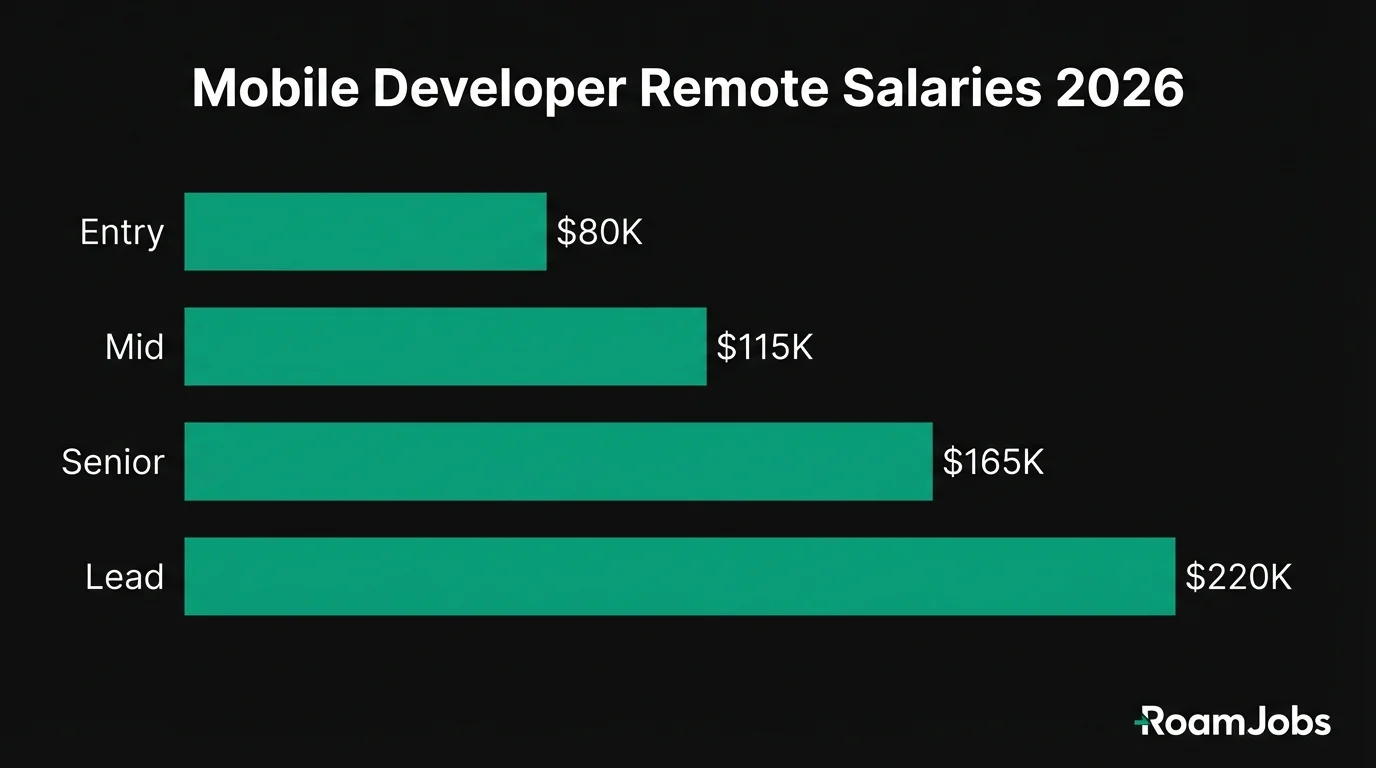
Remote mobile developers build applications for iOS and Android devices, earning between $75,000 and $220,000 for US-based remote positions in 2026. The role divides into three primary paths: native iOS development (Swift/SwiftUI), native Android development (Kotlin/Jetpack Compose), and cross-platform development (React Native or Flutter). Remote mobile development is highly viable because the work is inherently asynchronous—you write code, submit pull requests, and iterate based on feedback without requiring constant face-to-face collaboration. The main remote challenge is device testing, which companies solve through cloud-based device farms, physical device budgets for home offices, and robust CI/CD pipelines. Cross-platform developers are increasingly in demand as companies seek cost-efficient solutions, while native specialists command premium salaries for performance-critical applications. Whether you choose iOS, Android, or cross-platform development depends on your career goals, market demand in your target companies, and personal interest in each ecosystem.
What Do Remote Mobile Developers Actually Do?
Remote mobile developers design, build, and maintain applications that run on smartphones and tablets. Unlike web development where your code runs in a browser, mobile development requires understanding platform-specific constraints, device capabilities, and app store requirements. The work is highly suitable for remote environments because mobile development follows clear, measurable deliverables: features ship, bugs get fixed, and performance metrics either improve or they don’t.
Day-to-Day Responsibilities
A typical day for a remote mobile developer involves a mix of coding, code review, and collaboration. You’ll spend most of your time implementing features, fixing bugs, and improving app performance. Code review is particularly important in remote settings—thorough reviews replace the casual desk-side conversations that happen in offices.
Core daily activities include:
- Writing and testing new features following design specifications
- Reviewing pull requests from teammates with detailed, actionable feedback
- Debugging issues reported by QA teams or users
- Participating in async standups via Slack, Notion, or similar tools
- Attending occasional video calls for sprint planning or design reviews
- Documenting technical decisions for future reference
- Monitoring crash reports and analytics dashboards
Remote mobile developers also handle platform-specific tasks like managing app store submissions, responding to app review feedback, handling certificate renewals, and ensuring compliance with Apple and Google guidelines. These administrative tasks can consume significant time, especially around major platform releases.
Native vs. Cross-Platform Development
The mobile development landscape offers three distinct technical paths, each with unique trade-offs for remote work:
Native iOS Development (Swift/SwiftUI)
Native iOS development uses Apple’s Swift programming language and frameworks like UIKit and SwiftUI. You’ll need a Mac for development, and your apps run exclusively on Apple devices. Native iOS offers the best performance, access to the latest platform features, and the most polished user experience. Companies with premium consumer apps (banking, health, gaming) typically prefer native development.
Native Android Development (Kotlin/Jetpack Compose)
Native Android development uses Kotlin (and occasionally Java) with frameworks like Jetpack Compose and the Android SDK. You can develop on any operating system (Mac, Windows, Linux), and your apps run on the diverse Android ecosystem. Android development involves handling device fragmentation—thousands of different screen sizes, processors, and OS versions. Companies serving global markets or enterprise customers often prioritize Android.
Cross-Platform Development (React Native/Flutter)
Cross-platform frameworks let you write code once and deploy to both iOS and Android. React Native uses JavaScript/TypeScript and React concepts, making it accessible for web developers. Flutter uses Dart and offers exceptional performance through its custom rendering engine. Cross-platform development is increasingly popular because it reduces team size and accelerates development. However, you’ll occasionally need platform-specific code and must understand both ecosystems.
Remote Mobile Development Challenges
Working remotely as a mobile developer introduces specific challenges beyond typical remote work obstacles:
Device Testing
Mobile apps must run flawlessly across hundreds of device configurations. While simulators handle basic testing, real device testing is essential. Remote companies solve this through:
- Cloud device farms (BrowserStack, AWS Device Farm, Firebase Test Lab) for automated testing
- Physical device budgets ($500-$2,000 annually) for developers to maintain test devices at home
- Dedicated QA teams with device labs who test builds remotely
Platform Release Cycles
Apple and Google release major OS updates annually, often requiring significant app changes. Remote teams must coordinate these updates across time zones, making clear documentation and async communication essential.
App Store Processes
App store submissions involve screenshots, descriptions, compliance documentation, and responding to reviewer feedback. These processes require careful coordination, especially when releases are time-sensitive.
Security and Certificates
Mobile apps require managing signing certificates, provisioning profiles, and API keys. Remote teams need secure methods for sharing these credentials, typically through secrets management systems or secure vaults.
Salary Breakdown by Experience Level
Mobile developer salaries vary significantly based on experience, platform specialization, and company type. These figures represent remote positions with US-based companies—the most competitive segment of the market.
Mobile Developer Salary by Experience & Location
| Level | 🇺🇸 US Remote | 🇪🇺 EU Remote | 🌎 LATAM | 🌏 Asia |
|---|---|---|---|---|
| Entry Level (0-2 yrs) | $75,000 - $100,000 | $48,000 - $68,000 | $30,000 - $50,000 | $22,000 - $42,000 |
| Mid-Level (2-5 yrs) | $110,000 - $155,000 | $72,000 - $105,000 | $52,000 - $80,000 | $40,000 - $68,000 |
| Senior (5-8 yrs) | $155,000 - $220,000 | $105,000 - $150,000 | $78,000 - $120,000 | $65,000 - $100,000 |
| Lead/Director (8+ yrs) | $195,000 - $290,000 | $140,000 - $210,000 | $100,000 - $165,000 | $85,000 - $140,000 |
* Salaries represent base compensation for remote positions. Actual compensation may vary based on company, experience, and specific location within region.
Salary Factors and Premiums
Several factors influence where you fall within these ranges:
Platform Specialization: iOS developers typically earn 8-12% more than Android developers at equivalent levels, primarily due to the smaller iOS talent pool and Mac hardware requirements. However, this gap is narrowing as Kotlin and Jetpack Compose attract more developers to Android.
Cross-Platform Expertise: Developers proficient in both React Native and native development command premiums of 10-15% because they can bridge teams and make architectural decisions spanning both approaches.
Industry Vertical: Fintech, healthcare, and gaming mobile developers earn 15-25% above general market rates due to specialized compliance requirements (HIPAA, PCI-DSS) or performance demands.
Company Stage: Series B+ startups and established tech companies pay the highest salaries. Early-stage startups often compensate with equity, while agencies and consultancies typically pay below market.
Seniority Breakdown: Skills, Expectations, and Career Paths
Understanding what’s expected at each level helps you identify skill gaps, set realistic salary expectations, and plan your career progression.
Entry Level / Junior Mobile Developer
0-2 years experience
What Entry-Level Mobile Developers Do
Entry-level mobile developers implement well-defined features, fix bugs, and learn the codebase under senior developer guidance. You’ll work from detailed specifications, write unit tests, and participate in code reviews—initially as a reviewer learning patterns, then as a contributor.
Required Skills
- One platform’s fundamentals: Either Swift with UIKit/SwiftUI basics OR Kotlin with Android SDK/Jetpack Compose basics OR React Native/Flutter with one framework
- Version control: Git workflows including branching, rebasing, and pull request processes
- Basic testing: Unit testing frameworks (XCTest, JUnit, Jest) and UI testing concepts
- API integration: REST API consumption, JSON parsing, and basic authentication
- Debugging: Using platform debugging tools, reading crash logs, and systematic problem-solving
How to Break Into Remote Mobile Development
Breaking into remote mobile development without experience requires demonstrating capability through tangible projects:
-
Build and publish 2-3 apps to the App Store or Google Play. Published apps prove you can navigate the full development lifecycle, not just tutorials.
-
Contribute to open source mobile projects on GitHub. Even documentation improvements or bug fixes demonstrate collaboration skills.
-
Create a portfolio showcasing your apps with screenshots, technical explanations, and download links. Explain architectural decisions and challenges overcome.
-
Target “remote-first” companies that are experienced with onboarding junior remote developers. Avoid companies new to remote work—they often struggle with junior developer mentorship.
-
Consider mobile-focused bootcamps or certifications from recognized programs. While not required, they can accelerate learning and provide structure.
-
Apply to companies building internal tools or B2B apps rather than consumer apps. These roles are less competitive and more forgiving of limited portfolios.
Mid-Level Mobile Developer
2-5 years experience
What Mid-Level Mobile Developers Do
Mid-level developers own features from design to deployment. You’ll translate product requirements into technical specifications, implement complex features independently, and mentor junior developers. At this level, you’re expected to identify potential issues before they become problems and propose solutions proactively.
Required Skills
- Deep platform expertise: Advanced knowledge of your primary platform (memory management, threading, performance optimization)
- Architectural patterns: MVVM, MVC, Clean Architecture, and when to apply each
- Testing maturity: Integration testing, UI testing automation, and test-driven development
- CI/CD familiarity: Setting up and maintaining mobile build pipelines (Fastlane, Bitrise, GitHub Actions)
- Cross-functional collaboration: Working effectively with designers, product managers, and backend engineers
- Technical communication: Writing clear technical documents, RFCs, and async updates
Specialization Choices
Mid-level is when you typically choose a specialization path:
Platform Specialist: Double down on iOS or Android, aiming for deep expertise in one ecosystem. Best for developers who enjoy the depth and want to work at companies with platform-specific teams.
Cross-Platform Generalist: Add React Native or Flutter to your skillset. Best for developers who enjoy variety and want to maximize job opportunities.
Mobile + Backend: Learn enough backend development to build full-stack mobile features. Valuable for startup environments and smaller teams.
Domain Specialist: Develop expertise in a vertical like fintech, healthcare, or gaming. Combines technical skills with business domain knowledge.
Senior Mobile Developer
5-8 years experience
What Senior Mobile Developers Do
Senior developers shape the technical direction of mobile products. You’ll make architectural decisions that impact the entire team, lead complex projects spanning multiple sprints, and serve as a technical resource for the organization. Remote senior developers must excel at async communication—your influence comes through documentation, code reviews, and written proposals rather than hallway conversations.
Required Skills
- System design: Designing mobile architectures that scale (modularization, dependency injection, offline-first patterns)
- Performance expertise: Profiling tools, memory optimization, battery efficiency, and app startup optimization
- Security knowledge: Secure storage, certificate pinning, authentication flows, and compliance requirements
- Technical leadership: Leading projects, unblocking teammates, and driving technical decisions without formal authority
- Mentorship: Growing junior and mid-level developers through code review, pairing, and career guidance
- Business acumen: Understanding how technical decisions impact product metrics and company goals
Architectural Responsibilities
Senior mobile developers make decisions that affect the entire codebase:
Modularization Strategy: Breaking monolithic apps into modules for faster build times, clearer ownership, and easier testing.
State Management: Choosing and implementing patterns for managing application state (Redux, MobX, Combine, Kotlin Flow).
Networking Layer: Designing robust API clients with caching, retry logic, and offline support.
Feature Flags: Implementing systems for gradual rollouts and A/B testing.
Analytics Architecture: Ensuring consistent event tracking across the app for product insights.
Lead / Director Mobile Developer
8+ years experience
What Lead/Director Mobile Developers Do
At the lead and director level, you’re responsible for the mobile platform strategy across the organization. This includes technology choices, team structure, hiring, and ensuring mobile development practices scale with company growth. You’ll spend less time writing code and more time enabling others to be effective.
Required Skills
- Platform strategy: Making build-vs-buy decisions, evaluating new technologies, and planning multi-year technical roadmaps
- Team building: Hiring, onboarding, and retaining mobile talent in a competitive market
- Cross-functional leadership: Aligning mobile strategy with product, design, and engineering leadership
- Vendor management: Evaluating and managing relationships with third-party services and tools
- Technical vision: Communicating complex technical concepts to non-technical stakeholders
- Organizational design: Structuring mobile teams for efficiency (platform teams, feature teams, guild models)
Platform Leadership
Directors and leads must navigate strategic questions:
Native vs. Cross-Platform: When should the company invest in native development versus cross-platform frameworks? This decision affects hiring, velocity, and long-term maintenance.
Platform Parity: How closely should iOS and Android experiences match? When is platform-specific design appropriate?
Technical Debt Management: Balancing feature velocity against codebase health. Setting standards for when and how to address accumulated debt.
Build vs. Buy: Evaluating third-party SDKs against building in-house solutions. Understanding the hidden costs of external dependencies.
Platform Relations: Managing relationships with Apple and Google, especially for enterprise or featured apps.
Skills and Tools Comparison
Understanding the technical landscape helps you make informed decisions about which technologies to learn and which companies to target.
Mobile Development Platforms Compared
Source: RoamJobs 2026 Platform Analysis| Platform | Language | Learning Curve | Performance | Job Market | Remote Friendliness |
|---|---|---|---|---|---|
| iOS Native | Swift/SwiftUI | Medium-High | Excellent | Strong | High |
| Android Native | Kotlin/Compose | Medium | Excellent | Very Strong | High |
| React Native | TypeScript/JS | Low-Medium | Good | Very Strong | Very High |
| Flutter | Dart | Medium | Very Good | Growing Fast | Very High |
Data compiled from RoamJobs 2026 Platform Analysis. Last verified January 2026.
iOS Development Stack
Core Languages and Frameworks:
- Swift: Apple’s modern language, required for all new iOS development
- SwiftUI: Declarative UI framework, increasingly standard for new projects
- UIKit: Imperative UI framework, still dominant in existing codebases
- Combine: Reactive programming framework for handling async events
- Core Data: Apple’s persistence framework for local data storage
Essential Tools:
- Xcode: Apple’s IDE, required for iOS development
- Instruments: Performance profiling and debugging
- TestFlight: Beta distribution for testing
- App Store Connect: App submission and analytics
Testing Frameworks:
- XCTest: Apple’s unit and UI testing framework
- Quick/Nimble: BDD-style testing for more expressive tests
- Snapshot testing: Visual regression testing
Android Development Stack
Core Languages and Frameworks:
- Kotlin: Google’s preferred language for Android development
- Jetpack Compose: Modern declarative UI framework
- Android SDK: Platform APIs and components
- Kotlin Coroutines: Async programming with structured concurrency
- Room: SQLite abstraction for local data persistence
Essential Tools:
- Android Studio: Official IDE based on IntelliJ
- Android Profiler: Performance analysis tools
- Google Play Console: App distribution and analytics
- Firebase: Google’s mobile platform for analytics, crash reporting, and more
Testing Frameworks:
- JUnit: Standard unit testing
- Espresso: UI testing framework
- Robolectric: Unit testing with Android framework simulation
React Native Stack
Core Technologies:
- TypeScript/JavaScript: Primary development language
- React: Component-based UI library
- React Navigation: Standard navigation solution
- Redux/MobX/Zustand: State management options
- AsyncStorage/MMKV: Local data persistence
Essential Tools:
- Expo: Simplified development and deployment platform
- Metro: JavaScript bundler for React Native
- Flipper: Debugging platform
- CodePush: Over-the-air update delivery
Testing Frameworks:
- Jest: JavaScript testing framework
- React Native Testing Library: Component testing
- Detox: End-to-end testing
Flutter Stack
Core Technologies:
- Dart: Google’s language for Flutter development
- Flutter SDK: Framework for building cross-platform apps
- Provider/Riverpod/Bloc: State management patterns
- Hive/Isar: Local database options
Essential Tools:
- Android Studio or VS Code: Recommended IDEs with Flutter plugins
- DevTools: Performance and debugging suite
- Codemagic/Bitrise: CI/CD platforms with Flutter support
Testing Frameworks:
- flutter_test: Built-in testing framework
- integration_test: Integration and end-to-end testing
- mockito: Mocking for unit tests
Mobile Testing Tools Compared
Source: RoamJobs Tool Analysis 2026| Tool | Type | Platforms | Best For | Pricing |
|---|---|---|---|---|
| BrowserStack | Cloud Device Farm | iOS, Android | Real device testing at scale | $199+/mo |
| Firebase Test Lab | Cloud Device Farm | Android, iOS | Android-focused testing, CI integration | Free tier + pay per use |
| AWS Device Farm | Cloud Device Farm | iOS, Android | Enterprise, AWS integration | $0.17/device minute |
| Appium | Test Automation | iOS, Android | Cross-platform test scripts | Free (open source) |
| Detox | E2E Testing | iOS, Android | React Native apps | Free (open source) |
| XCTest | Unit/UI Testing | iOS only | Native iOS testing | Free (included) |
| Espresso | UI Testing | Android only | Native Android testing | Free (included) |
Data compiled from RoamJobs Tool Analysis 2026. Last verified January 2026.
Skills by Seniority Level
Entry Level (0-2 years):
- One platform fundamentals (iOS, Android, or cross-platform)
- Git version control
- Basic unit testing
- REST API consumption
- Debugging techniques
Mid-Level (2-5 years):
- Deep platform expertise
- Architectural patterns (MVVM, Clean Architecture)
- CI/CD setup and maintenance
- Integration and UI testing
- Performance basics
Senior Level (5-8 years):
- System design for mobile
- Performance optimization and profiling
- Security implementation
- Technical leadership
- Mentorship skills
Lead/Director (8+ years):
- Platform strategy
- Team building and hiring
- Vendor evaluation
- Cross-functional leadership
- Technical vision communication
Learning Path Recommendations
For Web Developers Transitioning to Mobile:
- Start with React Native—your React skills transfer directly
- Learn one native platform (iOS or Android) to understand platform capabilities
- Add Flutter for broader cross-platform opportunities
For New Developers Entering Mobile:
- Choose one native platform (iOS if you have a Mac, Android if not)
- Build and publish 2-3 apps to learn the full lifecycle
- Add cross-platform skills once you understand native development
For Native Developers Adding Cross-Platform:
- Learn React Native if you know JavaScript/React
- Learn Flutter if you want to try Dart and prefer Google’s approach
- Your native knowledge makes you valuable for platform-specific features
Companies Hiring Remote Mobile Developers
The remote mobile job market spans consumer apps, B2B products, enterprise solutions, and developer tools. Understanding these segments helps you target companies aligned with your interests.
Remote-First Mobile Teams
These companies built distributed mobile teams from the ground up:
Automattic (WordPress, Tumblr, WooCommerce)
- 1,900+ distributed employees worldwide
- Strong async culture with annual meetups
- Mobile teams for WordPress and Tumblr apps
- Competitive salaries with location-agnostic philosophy
GitLab
- All-remote company with 1,500+ employees
- Mobile app for GitLab platform
- Exceptional documentation practices
- Strong iOS and Android opportunities
Zapier
- 500+ remote employees
- Mobile app development for automation platform
- Known for excellent work-life balance
- Strong engineering culture
Doist (Todoist, Twist)
- Fully remote since founding
- Building productivity apps for iOS and Android
- Native and cross-platform development
- Strong emphasis on async communication
Buffer
- Fully distributed social media management company
- Mobile apps for iOS and Android
- Transparent salary formula
- Strong remote culture
Consumer App Companies
Consumer apps require polished mobile experiences and often pay premium salaries:
Airbnb
- Remote-friendly with “Live and Work Anywhere” policy
- Large mobile teams for traveler and host apps
- Native iOS and Android development
- High compensation with equity
Spotify
- Distributed workforce across offices and remote
- Major investment in mobile experience
- Both native and cross-platform opportunities
- Strong engineering culture
Coinbase
- Remote-first cryptocurrency platform
- Mobile-first user experience
- React Native and native development
- Competitive crypto-industry salaries
DoorDash
- Hybrid with significant remote opportunities
- Consumer, merchant, and dasher apps
- Native iOS and Android teams
- Growth-stage compensation packages
Instacart
- Remote-first since 2020
- Shopper and customer mobile apps
- iOS and Android opportunities
- Strong product engineering culture
B2B and Enterprise Mobile
B2B mobile often offers more work-life balance than consumer companies:
Slack (Salesforce)
- Large remote workforce
- iOS and Android native teams
- Enterprise-grade mobile development
- Strong documentation culture
Notion
- Remote-first collaboration platform
- Mobile apps for iOS and Android
- React Native development
- Fast-growing company
Figma (Adobe)
- Distributed design tool company
- Mobile app development opportunities
- Strong engineering culture
- Competitive compensation
HubSpot
- Flexible remote work arrangements
- CRM mobile applications
- iOS and Android development
- Strong benefits package
Twilio
- Remote-first cloud communications
- Mobile SDKs and reference apps
- Developer-focused culture
- Strong compensation
Developer Tools and Infrastructure
Companies building mobile developer tools offer unique opportunities:
Expo
- React Native tooling company
- Fully remote team
- Deep React Native expertise required
- Open source contributions
RevenueCat
- Mobile subscription infrastructure
- Remote-first company
- SDKs for iOS and Android
- Deep platform expertise valued
Sentry
- Error monitoring platform
- Remote-friendly culture
- Mobile SDK development
- Cross-platform opportunities
Bitrise
- Mobile CI/CD platform
- Distributed team
- Deep mobile build system knowledge
- Platform engineering focus
Platform-Specific Opportunities
iOS-Heavy Companies:
- Companies with premium consumer products (fintech, health, luxury)
- Apple ecosystem companies
- Hardware-integrated apps
Android-Heavy Companies:
- Companies serving emerging markets
- Enterprise and MDM solutions
- Hardware manufacturers
Cross-Platform Opportunities:
- Startups optimizing development velocity
- Companies with limited mobile team size
- Internal tools and productivity apps
Interview Deep Dive
Mobile developer interviews test technical skills, platform knowledge, and problem-solving ability. Remote interviews add emphasis on communication skills and async collaboration.
Technical Interview Questions
The iOS app lifecycle includes several states: Not Running, Inactive, Active, Background, and Suspended. Key delegate methods include:
application(_:didFinishLaunchingWithOptions:)- Initial setup when app launchesapplicationWillEnterForeground(_:)- Preparing to become activeapplicationDidBecomeActive(_:)- App is now in foregroundapplicationWillResignActive(_:)- App is losing focusapplicationDidEnterBackground(_:)- App moved to backgroundapplicationWillTerminate(_:)- App is being terminated
For background tasks, iOS provides several mechanisms:
- Background fetch for periodic content updates
- Background processing for longer tasks using BGProcessingTask
- Background URL sessions for network transfers
- Push notifications with silent notifications for server-triggered updates
I structure background work by registering task identifiers in Info.plist, using BGTaskScheduler to schedule tasks, and ensuring tasks complete within time limits or request additional time with beginBackgroundTask(expirationHandler:).
Offline-first architecture requires several components:
Local Database Strategy:
- Use a robust local database (Core Data, Room, Realm, or SQLite)
- Design schema to support both local changes and server data
- Include metadata for sync state (created, modified, synced timestamps)
Sync Engine Design:
- Implement a queue for pending changes when offline
- Use conflict resolution strategies (last-write-wins, server-wins, or merge)
- Handle partial sync failures gracefully
Network Layer:
- Detect connectivity state and queue requests when offline
- Implement retry logic with exponential backoff
- Cache responses with appropriate invalidation
UI Considerations:
- Show sync status indicators to users
- Allow optimistic UI updates with rollback on failure
- Handle merge conflicts with user input when necessary
Implementation Example: For a notes app, I’d store notes locally first, mark them as “pending sync,” display immediately to the user, then sync when online. If the server rejects changes (conflict), I’d show the user both versions and let them resolve.
Both handle asynchronous programming but with different philosophies:
Kotlin Coroutines:
- Native Kotlin support with structured concurrency
- Suspending functions look like synchronous code
- Scopes (viewModelScope, lifecycleScope) automatically handle cancellation
- Lower learning curve for Kotlin developers
- Less boilerplate for simple async operations
- Built-in support in Android Jetpack libraries
RxJava:
- Powerful operators for complex data transformations
- Observable streams for reactive programming patterns
- Better for complex event composition
- Steep learning curve but powerful once mastered
- Large existing ecosystem and community
- More verbose but explicit about data flow
When to use each:
- Coroutines for straightforward async operations, API calls, database access
- RxJava for complex event streams, combining multiple data sources, sophisticated error handling
Modern Android development favors Coroutines with Flow for most use cases, as they integrate seamlessly with Jetpack Compose and ViewModel.
Memory leaks occur when objects are retained longer than needed. Common causes and solutions:
iOS Specific:
- Retain cycles in closures: Use
[weak self]or[unowned self]capture lists - Delegate patterns: Declare delegates as weak references
- NotificationCenter: Remove observers in deinit
- Timers: Invalidate timers when no longer needed
- Tools: Use Instruments’ Leaks and Allocations tools, Xcode Memory Graph
Android Specific:
- Context leaks: Avoid storing Activity context in long-lived objects
- Static references: Don’t hold static references to Views or Activities
- Inner classes: Use static inner classes with WeakReference
- Handlers: Remove callbacks and messages in onDestroy
- Tools: Android Profiler, LeakCanary library
General Practices:
- Follow lifecycle-aware patterns (ViewModel, LiveData on Android; Combine on iOS)
- Use dependency injection to manage object lifecycles
- Regular profiling during development, not just when issues arise
- Code review focus on reference management
Secure storage implementation varies by platform:
iOS:
- Use Keychain Services for tokens, credentials, and sensitive data
- Set appropriate accessibility levels (kSecAttrAccessibleWhenUnlockedThisDeviceOnly)
- Use biometric authentication for additional security (LocalAuthentication framework)
- Consider Data Protection API for file-level encryption
- Never store sensitive data in UserDefaults or unencrypted files
Android:
- Use EncryptedSharedPreferences from AndroidX Security library
- For more control, use Android Keystore directly
- Implement biometric authentication with BiometricPrompt
- Use encrypted databases for larger sensitive data sets
- Set appropriate security configurations in Android Manifest
Cross-Platform:
- Abstract secure storage behind platform-agnostic interfaces
- React Native: use react-native-keychain
- Flutter: use flutter_secure_storage
- Verify each package’s underlying implementation
General Practices:
- Never log sensitive data
- Implement certificate pinning for network requests
- Clear sensitive data when user logs out
- Handle keychain/keystore errors gracefully
App startup optimization requires measuring first, then targeted improvements:
Measurement:
- Define metrics: Time to First Frame, Time to Interactive
- Use platform tools: Instruments (iOS), Android Profiler, Firebase Performance
- Establish baseline and set targets
iOS Optimizations:
- Reduce dynamic library loading (prefer static linking)
- Minimize work in
didFinishLaunchingWithOptions - Defer non-critical initialization
- Use lazy loading for heavy objects
- Optimize storyboard/XIB complexity
- Profile and optimize main thread work
Android Optimizations:
- Use App Startup library for initializing libraries
- Reduce Application.onCreate() work
- Avoid heavy layout inflation at startup
- Use content providers sparingly
- Defer Dagger/Hilt initialization when possible
- Optimize splash screen to App Startup guidelines
General Strategies:
- Lazy load features not needed at startup
- Prefetch data users will likely need
- Cache aggressively for returning users
- Profile third-party SDKs—they often cause startup delays
- Consider modularization to reduce initial binary size
Deep linking allows external URLs to open specific content within your app:
iOS Implementation:
- URL Schemes: Custom URLs (myapp://path), configured in Info.plist
- Universal Links: Standard HTTPS URLs that open your app, requires apple-app-site-association file
- Handle in AppDelegate or SceneDelegate with
application(_:open:options:)orscene(_:continue:) - Parse URL components and route to appropriate view controllers
Android Implementation:
- Intent Filters: Define in AndroidManifest.xml for URL schemes or App Links
- App Links: HTTPS URLs verified with assetlinks.json file
- Handle in Activity with
intent.dataURI parsing - Use Navigation component for cleaner deep link handling
Cross-Platform Considerations:
- React Native: Use react-navigation linking configuration
- Flutter: Use go_router or auto_route for deep link handling
- Ensure deferred deep linking for users who install from a link
Best Practices:
- Validate and sanitize all URL parameters
- Handle authentication state—redirect to login if needed
- Provide fallback behavior for malformed links
- Track deep link performance in analytics
- Test thoroughly across all entry points
A comprehensive mobile testing strategy includes multiple layers:
Unit Tests (70% of tests):
- Test business logic, view models, and utilities
- Mock dependencies using protocols/interfaces
- Run quickly on every commit
- Target 70-80% code coverage for business logic
Integration Tests (20% of tests):
- Test component interactions
- Verify database operations, API parsing, navigation flows
- Run on CI for each PR
End-to-End Tests (10% of tests):
- Test critical user flows
- Run on real devices or device farms
- Include smoke tests for app launch and core functionality
- Run before releases
Platform-Specific Considerations:
- iOS: XCTest for unit/UI, snapshot testing for visual regression
- Android: JUnit + Mockito for unit, Espresso for UI
- React Native: Jest for unit, Detox for E2E
- Flutter: flutter_test for unit, integration_test for E2E
CI/CD Integration:
- Run unit tests on every push
- Run integration tests on PR merge
- Run E2E tests nightly and before releases
- Use cloud device farms for device diversity
Behavioral and Remote Work Questions
A strong answer demonstrates decision-making process and outcomes:
Situation: We needed to choose between React Native and Flutter for a new cross-platform project, with a tight timeline and limited resources.
Action: I gathered available information: team expertise (strong in React), project requirements (complex animations, native module needs), timeline (3 months to MVP). I created a comparison document analyzing both options against our specific needs.
Key considerations:
- Team learning curve favored React Native
- Flutter offered better animation performance
- React Native had more available third-party packages
- Both could meet our deadline
Decision: Recommended React Native based on team velocity—we could ship faster with our existing React expertise, and the animation requirements weren’t complex enough to require Flutter’s rendering engine.
Result: We launched MVP on time. Six months later, the decision proved correct—rapid iteration was more valuable than theoretical performance benefits.
Lesson: Document decisions and reasoning for future reference. Revisit major technical decisions periodically.
Staying current in mobile development requires intentional effort:
Regular Learning Habits:
- Follow official channels (Apple Developer News, Android Developers Blog)
- Subscribe to curated newsletters (iOS Dev Weekly, Android Weekly)
- Watch WWDC and Google I/O sessions annually
- Listen to podcasts during commute or exercise (Swift by Sundell, Fragmented)
Community Engagement:
- Participate in Discord/Slack communities (iOS Developers, Kotlin, Flutter)
- Follow key developers on Twitter/X for real-time updates
- Attend virtual conferences and meetups
- Contribute to discussions on Reddit communities
Hands-On Learning:
- Experiment with new frameworks in side projects
- Migrate personal projects to new APIs when released
- Participate in beta testing for new OS versions
Team Knowledge Sharing:
- Host async show-and-tell sessions via Loom or documentation
- Maintain internal tech radar for tracking new technologies
- Rotate responsibility for summarizing major platform updates
Remote device testing requires a combination of approaches:
Personal Device Lab:
- Maintain 3-5 devices covering key form factors and OS versions
- Request device budget from employer ($500-$1,000 annually)
- Include both iOS and Android for cross-platform roles
Cloud Device Farms:
- Use BrowserStack, Firebase Test Lab, or AWS Device Farm for broad device coverage
- Run automated tests on CI against multiple device configurations
- Use for devices you don’t own or edge cases
Simulator/Emulator Testing:
- First line of testing for quick iteration
- Create configurations matching target devices
- Understand limitations (performance, sensors, specific hardware)
Coordinated Team Testing:
- Share testing responsibilities across team members with different devices
- Document device matrix and who covers which devices
- Schedule structured testing sessions before releases
Best Practices:
- Define target device matrix based on analytics data
- Automate as much as possible for consistency
- Reserve manual testing for UX validation and edge cases
- Test on actual devices before any release
Async blocker communication requires structure and context:
Immediate Communication:
- Post in appropriate channel (project, team, or help channel)
- Include clear subject/thread title describing the blocker
- Don’t wait—surface blockers as soon as identified
Structured Message Content:
- What you’re trying to accomplish (context)
- What’s blocking you (specific issue)
- What you’ve already tried (shows effort)
- What you think might help (suggests path forward)
- Urgency level (helps others prioritize)
Example: “Blocked on user authentication flow. The OAuth token refresh is failing silently on iOS 17+. Tried updating the keychain access configuration and checking Apple’s migration guide. Suspect it’s related to the new app attest requirements. Could use help from someone with recent iOS 17 keychain experience. This blocks the login flow—high priority.”
Follow-Up:
- Provide updates as you learn more
- Document the resolution for future reference
- Thank helpers publicly to encourage collaborative culture
Escalation Path:
- Know when to escalate to manager or tech lead
- Tag specific experts if you know who can help
- If truly stuck, schedule a sync call rather than blocking for days
Cross-timezone collaboration requires structured handoffs:
Upfront Alignment:
- Request comprehensive specs before starting
- Ask clarifying questions in batch via written document
- Review designs thoroughly and document assumptions
- Create shared Figma/design file for async feedback
Progressive Development:
- Start with clear requirements and make reasonable decisions for ambiguous cases
- Document all decisions made in the PR or project doc
- Share progress via screenshots/videos (Loom) for async review
- Flag major decisions for sync review before investing heavily
Overlap Optimization:
- Identify any overlapping hours (even 1-2 hours)
- Use overlap for live discussions on complex issues
- Schedule recurring syncs if collaboration is ongoing
Communication Artifacts:
- Maintain running document of questions and decisions
- Use video recordings for context-heavy explanations
- Create before/after comparisons for design changes
- Leave detailed PR descriptions explaining implementation choices
Flexibility:
- Accept that some decisions will need revision
- Build with modularity for easier changes
- Embrace iteration rather than seeking perfect first attempt
System Design Questions
This system design covers mobile-specific considerations:
Core Features:
- Photo capture and editing
- Upload and storage
- Feed of photos from followed users
- Likes, comments, and sharing
Mobile Architecture:
Client-Side:
- Image capture: Use platform camera APIs with custom camera view
- Image processing: Resize and compress before upload (max 2048px, JPEG 80% quality)
- Caching: Two-tier cache (memory + disk) for images
- Offline support: Queue uploads when offline, sync when connected
Network Layer:
- Image uploads: Resumable uploads with chunking for large files
- Feed loading: Paginated API with cursor-based pagination
- CDN integration: Load images from edge servers based on location
- Progressive loading: Load thumbnails first, then full resolution
Data Storage:
- Local database: Store feed items, user data, pending uploads
- Media cache: LRU cache for images with configurable size limit
- Sync state: Track what’s uploaded vs pending
Backend Considerations:
API Design:
- Separate media upload endpoints from metadata endpoints
- Use presigned URLs for direct-to-storage uploads
- GraphQL or REST with efficient payload design
Storage:
- Object storage (S3) for images
- Multiple resolutions generated server-side
- CDN for distribution
Performance Optimizations:
- Prefetch next page of feed while scrolling
- Background upload processing
- Image placeholder while loading
- Adaptive image quality based on network conditions
Scaling Considerations:
- Shard feed storage by user for scalability
- Eventual consistency acceptable for social features
- Rate limiting on uploads and API calls
Banking apps require security-first architecture:
Security Requirements:
- Data encryption at rest and in transit
- Biometric and multi-factor authentication
- Session management and timeout
- Secure communication (certificate pinning)
- No sensitive data in logs or crash reports
Authentication Architecture:
Multi-Factor Authentication:
- Username/password + device verification
- Biometric confirmation for sensitive actions
- One-time passwords for transactions
- Hardware security key support for high-value accounts
Session Management:
- Short-lived access tokens (15-30 minutes)
- Refresh token rotation
- Device binding for tokens
- Automatic logout on suspicious activity
Secure Data Handling:
Storage:
- Keychain (iOS) / Encrypted SharedPreferences (Android) for credentials
- No sensitive data in UserDefaults or plain files
- Encrypted database for transaction cache
- Clear all data on logout
Network:
- Certificate pinning for all API calls
- No sensitive data in URLs (use POST bodies)
- Request signing for integrity verification
- TLS 1.3 minimum
Platform Security:
iOS Specific:
- Enable App Transport Security
- Use Secure Enclave for key operations
- Data Protection API for files
- Jailbreak detection (with graceful degradation)
Android Specific:
- Network security configuration
- SafetyNet/Play Integrity attestation
- Root detection (with graceful degradation)
- Proper ProGuard/R8 obfuscation
Compliance Considerations:
- Logging for audit trails (without sensitive data)
- Privacy controls for user data
- GDPR/CCPA compliance features
- Accessibility requirements (WCAG)
Architecture Pattern:
- Clean Architecture with clear security boundaries
- Separate security module for authentication/encryption
- Feature flags for security-related rollouts
- Comprehensive unit testing for security logic
Real-time messaging requires careful consideration of mobile constraints:
Core Requirements:
- Instant message delivery
- Message persistence and sync
- Typing indicators and read receipts
- Offline support with sync on reconnect
- Push notifications for background delivery
Real-Time Connection:
Protocol Choice:
- WebSocket for persistent bidirectional connection
- MQTT as lighter alternative for constrained devices
- Fallback to polling if connections fail
Connection Management:
- Automatic reconnection with exponential backoff
- Connection state UI (connecting, connected, disconnected)
- Graceful degradation to polling on repeated failures
- Battery-conscious keep-alive intervals
Message Architecture:
Client-Side:
- Local database for message storage (SQLite, Realm)
- Send queue for offline messages
- Optimistic UI updates with rollback on failure
- Pagination for message history
Message Flow:
- User sends message → stored locally as “sending”
- WebSocket sends to server
- Server broadcasts to recipients
- Sender receives ACK → status becomes “sent”
- Recipients receive → status becomes “delivered”
- Recipients view → status becomes “read”
Offline Support:
- Queue outgoing messages with timestamp
- Process queue on reconnection
- Conflict resolution for simultaneous sends
- Sync mechanism for missed messages during offline period
Push Notifications:
- Silent notifications for message delivery when app is open
- Alert notifications when app is closed
- Notification grouping for multiple messages
- Action buttons for quick replies
Performance Considerations:
- Image/file attachments via separate upload flow
- Compression for message payload
- Batch typing indicator updates (debounce)
- Efficient diff syncing for message status updates
Scalability:
- Horizontal WebSocket server scaling with session affinity
- Message queue (Kafka) for reliable delivery
- Read replicas for message history queries
What Hiring Managers Look For
Remote mobile hiring managers evaluate candidates across several dimensions:
Technical Competence:
- Deep knowledge of at least one platform
- Understanding of mobile-specific challenges (lifecycle, memory, battery)
- Testing practices and code quality standards
- System design ability appropriate to level
Remote Work Readiness:
- Clear written communication demonstrated in application materials
- Evidence of self-direction and initiative
- Experience with async collaboration (open source, previous remote work)
- Professional home workspace setup
Problem-Solving Approach:
- Structured thinking through technical problems
- Ability to make decisions with incomplete information
- Balance between shipping fast and building right
- Learning from mistakes and iterating
Cultural Fit:
- Alignment with company values and work style
- Collaboration orientation despite remote setting
- Growth mindset and continuous learning
- Respect for teammates’ time and attention
Remote Mobile Developer Job Search Checklist
Remote Mobile Developer Career Launch
- 1 Choose your platform focus: iOS, Android, or cross-platform
Consider market demand, learning curve, and personal interest
- 2 Build and publish 2-3 apps to the App Store or Google Play
Published apps prove you can navigate the full development and review process
- 3 Create a portfolio website showcasing your mobile work
Include screenshots, technical details, download links, and code samples
- 4 Optimize your GitHub profile with mobile-specific projects
Pin repositories with clean code, tests, and documentation
- 5 Set up a professional home development environment
Mac required for iOS; multiple test devices recommended
- 6 Master platform-specific interview topics for your focus area
Review common questions above and practice implementing patterns
- 7 Practice system design for mobile applications
Focus on offline-first, caching, and real-time features
- 8 Prepare behavioral stories emphasizing remote work skills
Focus on async communication, self-direction, and technical leadership
- 9 Create target list of 20-30 remote mobile positions
Research company tech stacks, culture, and compensation philosophy
- 10 Apply to 5-10 positions weekly with customized applications
Quality applications with portfolio links outperform mass applications
Frequently Asked Questions
Frequently Asked Questions
Should I learn iOS or Android development for better remote job prospects?
Both platforms offer excellent remote opportunities, but they differ in important ways. Android has more job postings overall due to its larger global market share, especially for companies serving emerging markets or enterprise customers. iOS typically pays 8-12% higher at equivalent levels due to a smaller developer pool and Mac hardware requirements. For maximum flexibility, learn one platform deeply first, then add cross-platform skills (React Native or Flutter). Your choice should factor in: whether you own a Mac (required for iOS), which ecosystem interests you more, and which platform your target companies prioritize.
Is native or cross-platform development better for remote mobile jobs?
Both paths are viable, with different trade-offs. Native development (Swift/Kotlin) offers deeper platform expertise, better performance for demanding apps, and typically higher salaries at senior levels. Cross-platform (React Native/Flutter) provides broader job opportunities, faster development velocity, and easier transitions for web developers. Remote-first companies often favor cross-platform for smaller teams, while larger companies with dedicated platform teams prefer native developers. The ideal combination is native expertise plus cross-platform familiarity—this makes you valuable across diverse team structures.
How do remote mobile developers handle device testing without a company device lab?
Remote mobile testing combines several approaches: maintaining a personal device collection (3-5 devices covering key configurations, with $500-$1,000 annual budget from employers), using cloud device farms (BrowserStack, Firebase Test Lab, AWS Device Farm) for broader coverage and automation, and coordinating with teammates to cover devices across the distributed team. Most companies provide equipment budgets for remote developers to purchase test devices. Automated testing on simulators/emulators handles routine verification, while real device testing focuses on UI/UX validation and performance profiling before releases.
Do I need App Store deployment experience to get a remote mobile developer job?
While not strictly required for junior positions, App Store deployment experience significantly strengthens your candidacy. Publishing apps demonstrates you can handle the complete development lifecycle: building, testing, meeting platform guidelines, responding to review feedback, and managing releases. For entry-level candidates, publish 2-3 personal projects or contribute to open-source apps that go through the review process. Mid-level and senior candidates are expected to have deployment experience. If you lack it, consider contributing to existing apps or volunteering for non-profits that need mobile development.
What's the interview process like for remote mobile developer positions?
Remote mobile interviews typically span 4-6 rounds over 2-4 weeks: (1) Recruiter screen covering experience and logistics, (2) Technical phone screen with coding, often a mobile-specific problem, (3) Take-home project or additional coding rounds building a small feature, (4) System design interview for mid+ levels focusing on mobile architecture, (5) Behavioral interviews emphasizing remote work skills and team collaboration, (6) Final round with hiring manager or team lead. The entire process is conducted via video conferencing. Companies emphasize written communication skills and may ask you to document your take-home solution or explain decisions asynchronously.
Is React Native or Flutter better for cross-platform remote jobs?
Both frameworks are excellent choices with strong job markets. React Native has a larger existing job market and easier learning curve for JavaScript/React developers, making it a safer choice for career flexibility. Flutter is growing rapidly, offers superior performance for complex animations, and provides more consistent UI across platforms. React Native jobs tend to exist at established companies with existing React codebases, while Flutter appears more in newer codebases and companies building from scratch. Consider learning the framework that aligns with your background: React Native if you know React/JavaScript, Flutter if you prefer learning Dart and want cutting-edge tooling.
How important is understanding both iOS and Android for cross-platform developers?
Understanding both platforms is crucial for cross-platform developers, even though you write shared code. You'll encounter platform-specific bugs, need to implement native modules for missing functionality, and must understand platform conventions for good UX. Effective cross-platform developers understand: platform navigation patterns (tab bars vs bottom navigation), design guidelines (Human Interface Guidelines vs Material Design), permission models, and platform-specific APIs. The best cross-platform developers can read and debug native code, even if they don't write it daily. Plan to spend 20-30% of learning time on native platform fundamentals.
What salary can I expect as a remote mobile developer outside the US?
Remote mobile developer salaries outside the US vary based on company compensation philosophy. Location-agnostic companies (GitLab, Zapier) pay similar rates globally, typically 80-100% of US market rates. Location-based companies adjust salaries by geography: EU developers typically earn 65-75% of US rates, LATAM developers 40-60%, and Asian developers 35-55%. Working for US companies from lower cost-of-living areas often provides the best purchasing power. Some companies use compensation bands by region, while others calculate local market rates plus a premium for working with US teams. Research each company's specific policy before negotiating.
How do remote mobile teams handle app release coordination across time zones?
Remote mobile teams use structured processes for release coordination: automated CI/CD pipelines that build and submit apps without manual intervention, documented release checklists accessible to all team members, staged rollouts that don't require immediate monitoring, and on-call rotations for critical release issues. Most teams designate a release manager who coordinates submissions and monitors initial rollout metrics. Async-friendly practices include: documenting rollback procedures, setting up automated alerts for crash spikes, and establishing clear escalation paths. Major releases may involve scheduled overlap time for real-time coordination.
Can I transition from web development to remote mobile development?
Yes, web developers successfully transition to mobile development regularly, especially through React Native. Your JavaScript/TypeScript skills, understanding of REST APIs, state management concepts, and component-based thinking all transfer. The learning curve involves: understanding mobile-specific constraints (memory, battery, network), learning platform navigation patterns, handling app lifecycle and background states, and understanding app store submission processes. For native development (Swift/Kotlin), expect 3-6 months of focused learning. For React Native, productive work is possible in 4-6 weeks with React experience. Build 1-2 published apps to demonstrate mobile-specific skills before applying.
What certifications help for remote mobile developer jobs?
Unlike some fields, mobile development doesn't have widely required certifications. Practical experience and portfolio projects matter more. That said, certain credentials can help: Google's Associate Android Developer certification demonstrates Kotlin/Android fundamentals, Apple's various Swift and iOS certifications show platform commitment, and cloud certifications (AWS, GCP) help for mobile backend work. Bootcamp certificates from recognized programs (coding bootcamps, Udacity) can help career changers demonstrate structured learning. For most candidates, time invested in building published apps provides better return than pursuing certifications.
How do I demonstrate mobile development skills without professional experience?
Demonstrate skills through tangible artifacts: publish apps to app stores (even simple utilities or games), contribute to open-source mobile projects on GitHub, create detailed case studies of your personal projects explaining technical decisions, and participate in mobile development communities. Quality matters more than quantity—two polished, well-documented apps demonstrate more than ten tutorial projects. Include in your portfolio: app store links, code repositories, screenshots, and technical write-ups explaining architecture choices. Consider building apps that solve real problems for small businesses or non-profits to gain realistic project experience.
Related Guides and Next Steps
Now that you understand the remote mobile developer landscape, deepen your knowledge with these related resources:
Career Path Guides
Remote Engineering Jobs: Complete Guide - Explore all engineering specializations and how mobile fits into the broader software engineering career landscape.
Remote Frontend Developer Jobs - If you’re considering web development alongside mobile, understand the frontend landscape and how skills transfer between web and mobile.
Interview Preparation
Remote Interview Guide - Master the unique aspects of remote interviews, from technical setup to async communication demonstrations.
Remote Interview Questions - Practice answering common remote work questions that appear in mobile developer interviews.
Job Search Strategy
Where to Find Remote Jobs - Discover the best job boards, communities, and strategies for finding remote mobile developer positions.
Remote Resume Guide - Optimize your resume for remote mobile developer positions with the right keywords and experience framing.
Compensation and Negotiation
Remote Salary Expectations - Understand how companies determine remote salaries and what to expect based on your location and target companies.
Negotiating Remote Salary - Learn tactics for negotiating mobile developer salaries, including platform-specific premiums and equity considerations.
Get Remote Mobile Developer Jobs in Your Inbox
Weekly curated remote iOS, Android, React Native, and Flutter positions from top companies. Plus salary insights and interview tips.
Frequently Asked Questions
How do I find remote mobile developer jobs?
To find remote mobile developer jobs, start with specialized job boards like We Work Remotely, Remote OK, and FlexJobs that focus on remote positions. Set up job alerts with keywords like "remote mobile developer" and filter by fully remote positions. Network on LinkedIn by following remote-friendly companies and engaging with hiring managers. Many mobile developer roles are posted on company career pages directly, so identify target companies known for remote work and check their openings regularly.
What skills do I need for remote mobile developer positions?
Remote mobile developer positions typically require the same technical skills as on-site roles, plus strong remote work competencies. Essential remote skills include excellent written communication, self-motivation, time management, and proficiency with collaboration tools like Slack, Zoom, and project management software. Demonstrating previous remote work experience or the ability to work independently is highly valued by employers hiring for remote mobile developer roles.
What salary can I expect as a remote mobile developer?
Remote mobile developer salaries vary based on experience level, company size, location-based pay policies, and the specific tech stack or skills required. US-based remote positions typically pay market rates regardless of where you live, while some companies adjust pay based on your location's cost of living. Entry-level positions start lower, while senior roles can command premium salaries. Check our salary guides for specific ranges by experience level and geography.
Are remote mobile developer jobs entry-level friendly?
Some remote mobile developer jobs are entry-level friendly, though competition can be high. Focus on building a strong portfolio or demonstrable skills, contributing to open source projects if applicable, and gaining any relevant experience through internships, freelance work, or personal projects. Some companies specifically hire remote junior talent and provide mentorship programs. Smaller startups and agencies may be more open to entry-level remote hires than large corporations.
Continue Reading
Remote Engineering Jobs 2026: Complete Guide to All Software Roles
The definitive hub for remote software engineering careers. Explore salary data, interview guides, and opportunities across frontend, backend, DevOps, ML, security, and more.
Remote Frontend Developer Jobs: Complete 2026 Career Guide
Everything you need to land a remote frontend developer job. Salary data by seniority, interview questions, companies hiring, and career paths.
Remote Jobs for Software Engineers 2026: Complete Guide
Everything software engineers need to know about finding remote positions, from job search to negotiation.
Land Your Remote Job Faster
Get the latest remote job strategies, salary data, and insider tips delivered to your inbox.