Remote UX Designer Jobs: Complete 2026 Career Guide
Everything you need to land a remote UX designer job. User research, wireframing, usability testing - salary data, interview questions, and companies hiring.
Updated January 20, 2026 • Verified current for 2026
Remote UX designers create user-centered digital experiences through research, wireframing, prototyping, and usability testing. Salaries range from $60,000 to $175,000 for individual contributors in the US market, with lead and director roles reaching $240,000 or more. The role requires a unique blend of empathy, analytical thinking, and design skills—you must understand users deeply while translating those insights into intuitive interfaces. Core competencies include user research methodology, information architecture, wireframing, prototyping, and usability testing. UX design is exceptionally well-suited for remote work because the research and documentation-heavy nature of the role translates seamlessly to asynchronous collaboration. Remote UX designers thrive by creating self-explanatory artifacts, writing detailed design rationale, and conducting user research sessions virtually.
What Do Remote UX Designers Actually Do?
Remote UX designers are responsible for understanding user needs and translating those insights into intuitive, effective digital experiences. Unlike UI designers who focus primarily on visual aesthetics, UX designers concentrate on the structure, flow, and usability of products. The “UX” in UX design stands for “user experience”—and your job is to make that experience as seamless and valuable as possible.
Day-to-Day Responsibilities
A typical week for a remote UX designer involves a mix of research, design, and collaboration activities.
User research and discovery
User research forms the foundation of UX design work. Remote UX designers conduct stakeholder interviews to understand business objectives, user interviews to uncover needs and pain points, competitive analysis to identify market opportunities, and survey design and analysis to gather quantitative insights. This research happens virtually through video calls, remote usability testing platforms, and collaborative documentation tools.
Information architecture and user flows
Once you understand user needs, you translate that understanding into structure. This includes creating sitemaps that organize content hierarchically, user flows that map the journey through key tasks, journey maps that visualize the complete user experience, and card sorting exercises to inform navigation structure.
Wireframing and prototyping
With the structure defined, you create wireframes—low-fidelity representations of screens that focus on layout, hierarchy, and functionality without visual design details. These evolve into interactive prototypes that simulate the actual user experience. Remote UX designers use tools like Figma to create these artifacts collaboratively, allowing stakeholders and team members to comment asynchronously.
Usability testing and iteration
UX designers validate their design decisions through usability testing. Remote testing is often more efficient than in-person sessions—you can recruit participants from anywhere, record sessions easily, and share findings with distributed teams. After each round of testing, you iterate on designs based on user feedback.
Documentation and handoff
Remote work demands excellent documentation. UX designers create detailed specifications, annotated wireframes, and design rationale documents that enable developers to implement designs accurately without constant synchronous communication.
UX Designer vs Product Designer vs UX Researcher
These three roles share overlapping skills but have distinct focuses.
UX Designer focuses primarily on the structure and flow of user experiences. Your deliverables include wireframes, user flows, prototypes, and usability testing reports. You may work with a separate UI designer who handles visual design, or you may have some visual design responsibilities yourself. The emphasis is on research-informed design decisions and validating those decisions through testing.
Product Designer combines UX and UI responsibilities into a single role. Product designers handle the complete design process from research through visual design and prototyping. This generalist role is increasingly common at tech companies that want designers to own the entire design experience. Product designers typically work more closely with product managers on feature strategy.
UX Researcher focuses exclusively on research methodology and insight generation. UX researchers conduct studies, synthesize findings, and deliver recommendations—but don’t create wireframes or visual designs. This specialized role exists at larger companies with mature design teams. If you love research but want to also create designs, UX design is a better fit than pure UX research.
Why UX Design Is Ideal for Remote Work
UX design is one of the most remote-friendly design specializations for several reasons.
Research translates naturally to remote
User interviews, usability tests, and surveys all work as well (or better) remotely as they do in person. Remote research tools have matured significantly, and many users prefer the convenience of participating from home. You can recruit participants from diverse geographic areas more easily, reducing bias in your research.
Artifact-based communication
UX designers communicate through tangible artifacts—wireframes, prototypes, journey maps, research reports. These artifacts speak for themselves when documented properly. You don’t need to explain your work in real-time if your documentation is clear and comprehensive.
Asynchronous collaboration works well
Unlike some roles that require constant real-time interaction, UX design work can be done independently with periodic syncs. You can research, wireframe, and prototype on your own schedule, then gather feedback asynchronously through comments and annotations in Figma or other tools.
Global user base alignment
Remote UX designers often have an advantage in understanding global users. Working remotely yourself helps you empathize with distributed users and design for asynchronous, international use cases.
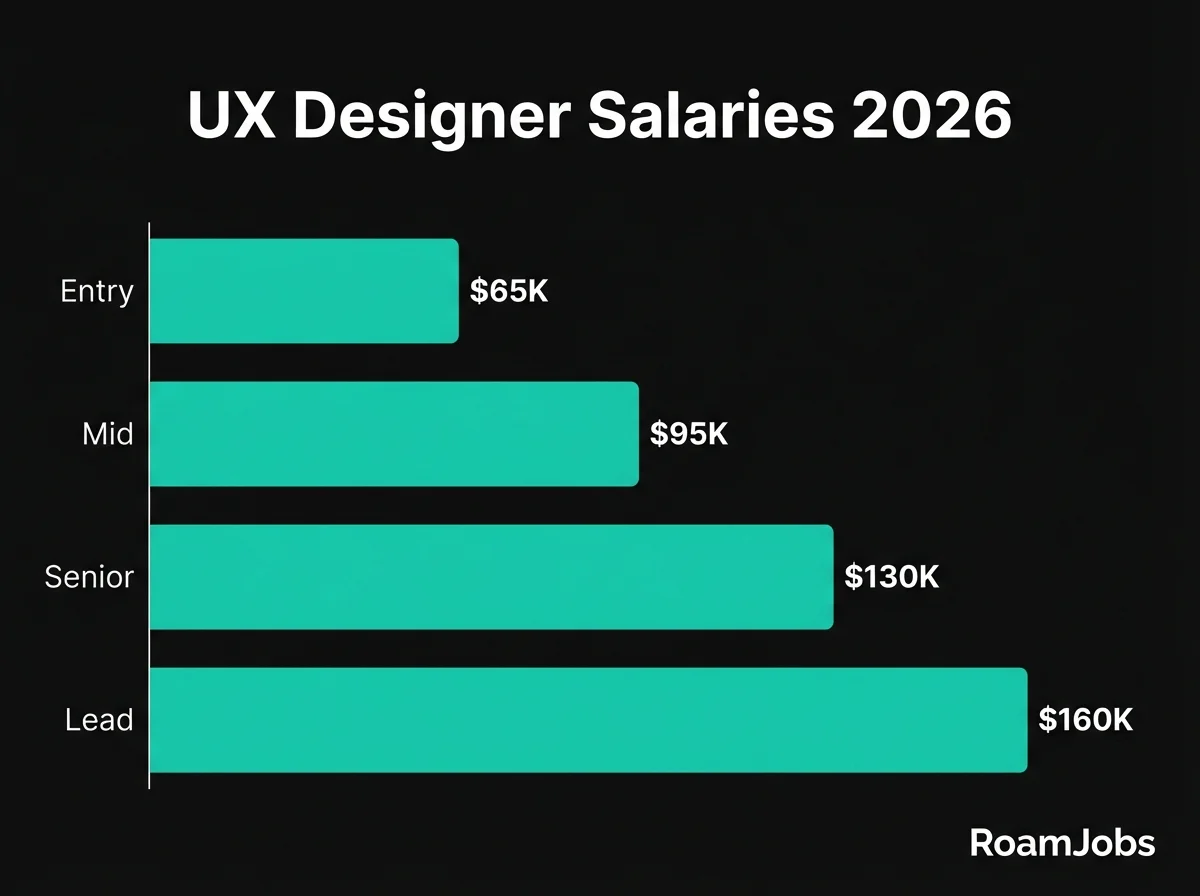
Salary Breakdown by Seniority Level
Understanding compensation expectations at each career stage helps you negotiate effectively and plan your career progression. These figures represent remote positions with US-based companies—the most competitive segment of the remote UX job market.
UX Designer Salary by Experience & Location
| Level | 🇺🇸 US Remote | 🇪🇺 EU Remote | 🌎 LATAM | 🌏 Asia |
|---|---|---|---|---|
| Entry Level (0-2 yrs) | $60,000 - $82,000 | $38,000 - $58,000 | $22,000 - $40,000 | $18,000 - $35,000 |
| Mid-Level (2-5 yrs) | $90,000 - $125,000 | $58,000 - $85,000 | $38,000 - $65,000 | $32,000 - $55,000 |
| Senior (5-8 yrs) | $125,000 - $175,000 | $82,000 - $125,000 | $58,000 - $95,000 | $48,000 - $82,000 |
| Lead/Director (8+ yrs) | $165,000 - $240,000 | $110,000 - $175,000 | $78,000 - $135,000 | $68,000 - $115,000 |
* Salaries represent base compensation for remote positions. Actual compensation may vary based on company, experience, and specific location within region.
Entry Level / Junior UX Designer
0-2 years experience
What Companies Expect
Entry-level remote UX designers are expected to have foundational knowledge of UX principles and demonstrate potential through portfolio projects. You don’t need years of professional experience, but you do need to show you understand the UX design process and can apply it effectively.
Required skills:
- Understanding of user-centered design principles
- Basic user research skills (interviews, usability testing)
- Wireframing and prototyping proficiency
- Figma fundamentals including components and auto-layout
- Written communication skills for documentation
- Ability to receive and incorporate feedback
Portfolio expectations:
At the entry level, your portfolio should include 3-4 well-documented case studies. These can be from bootcamps, personal projects, volunteer work, or internships—the source matters less than the quality of documentation. Each case study should demonstrate your process from problem definition through solution, including any research you conducted and how you validated your designs.
Hiring managers look for clear thinking and process over polished visual design. Show your wireframes, explain your decisions, and document what you learned from testing. Bootcamp projects are acceptable if you personalize them beyond the course requirements.
Day-to-day at this level:
Junior UX designers typically work under the guidance of senior designers or design leads. You’ll receive clear direction on projects and have support for research and design decisions. Expect to participate in user research sessions (often led by more senior team members), create wireframes based on established patterns, and iterate based on feedback. You’ll contribute to larger projects rather than owning entire features independently.
Path to mid-level:
To advance from entry to mid-level, focus on developing independence in your work. Take ownership of smaller features or projects end-to-end. Deepen your research skills by designing and conducting your own studies. Build expertise in one area (like information architecture or usability testing) while maintaining breadth. Document your impact—how did your designs improve user experience or business metrics?
Mid-Level UX Designer
2-5 years experience
What Companies Expect
Mid-level UX designers work independently on features and small projects with minimal supervision. You’re expected to drive the UX design process from research through implementation, collaborating effectively with product managers, developers, and other stakeholders.
Required skills:
- Independent user research planning and execution
- Information architecture and content strategy
- Advanced prototyping for complex interactions
- Design system contribution and consumption
- Stakeholder presentation and persuasion
- Cross-functional collaboration with engineers and PMs
- Mentoring junior designers (informal)
Portfolio expectations:
Your portfolio should showcase 4-5 professional case studies demonstrating impact. At this level, hiring managers want to see real products you’ve shipped, with evidence of how your work affected user behavior or business outcomes. Include metrics where possible: “reduced task completion time by 35%” or “increased user satisfaction scores from 3.2 to 4.1.”
Each case study should demonstrate strategic thinking—why did you prioritize certain features? How did you navigate constraints? What tradeoffs did you make? Show that you can think beyond individual screens to understand the complete user journey and business context.
Day-to-day at this level:
Mid-level UX designers own the UX for specific features or product areas. You’ll plan and conduct user research independently, create and validate wireframes and prototypes, present designs to stakeholders, and collaborate with developers during implementation. You may begin mentoring junior designers informally and contributing to design system development.
Expect to work across 2-3 projects simultaneously, managing your own time and priorities. You’ll participate in design critiques, provide feedback to peers, and begin influencing design direction beyond your immediate projects.
Path to senior:
To reach senior level, you need to demonstrate impact at a broader scale. Lead research initiatives that inform product strategy. Develop expertise in a UX specialty (like enterprise UX, mobile patterns, or accessibility). Show leadership through mentoring, leading design initiatives, and advocating for UX across the organization. Build a track record of successful projects with measurable outcomes.
Senior UX Designer
5-8 years experience
What Companies Expect
Senior UX designers are expert practitioners who drive UX strategy for significant product areas. You’re expected to work autonomously, influence product direction, mentor other designers, and raise the bar for UX quality across the organization.
Required skills:
- Strategic UX thinking and product vision
- Advanced research methodology and study design
- Facilitating remote workshops and design sprints
- Design system strategy and governance
- Technical understanding for feasibility evaluation
- Stakeholder management and executive communication
- Formal mentorship and design leadership
- Advocacy for UX investment and resources
Portfolio expectations:
Senior portfolios must demonstrate strategic impact. Each case study should show how you shaped product direction, not just executed designs. Include examples of how you influenced roadmaps, advocated for user needs at the executive level, and drove organizational UX maturity.
Hiring managers look for evidence of leadership—did you mentor others? Establish design processes? Advocate for research investment? Show the scope and complexity of problems you’ve solved, and demonstrate your ability to navigate ambiguity and organizational challenges.
Day-to-day at this level:
Senior UX designers own UX for entire product areas or multiple features. You’ll set UX direction, conduct or lead strategic research initiatives, and influence product roadmaps based on user insights. Expect to spend significant time mentoring, reviewing others’ work, and advocating for UX across the organization.
You’ll navigate complex stakeholder relationships, present to executives, and make difficult tradeoff decisions. Remote senior designers must excel at asynchronous leadership—writing influential documents, creating compelling presentations, and building relationships across distributed teams.
Path to lead/director:
To move into leadership, develop your people management and organizational skills. Some senior designers remain as senior individual contributors (IC track), while others transition to management. If you want to pursue the management track, seek opportunities to lead design teams, drive hiring, and shape design culture. Build skills in performance management, team development, and organizational design.
Lead / Director UX Designer
8+ years experience
What Companies Expect
UX design leads and directors are responsible for UX strategy across multiple products or an entire organization. You manage designers, set design direction, build teams, and ensure UX quality at scale. This role combines deep UX expertise with management and leadership skills.
Required skills:
- UX strategy and vision setting
- Team building, hiring, and performance management
- Cross-functional leadership with product and engineering leaders
- Budget planning and resource allocation
- Executive communication and influence
- Design operations and process improvement
- Organizational design for UX teams
- Vendor and contractor management
Portfolio expectations:
At this level, your portfolio shifts from individual project work to demonstrating leadership impact. Include case studies on team building, process transformation, and organizational UX strategy. Show how you’ve scaled UX capabilities, improved design operations, and driven cultural change.
Some hiring processes for director roles de-emphasize portfolios in favor of leadership conversations. Be prepared to discuss your management philosophy, how you’ve built and developed teams, and how you’ve influenced organizational strategy.
Day-to-day at this level:
Directors spend the majority of their time on people management, strategy, and cross-functional leadership rather than hands-on design work. You’ll conduct one-on-ones with direct reports, participate in product and leadership meetings, drive hiring, and ensure UX quality through review processes and mentorship.
Remote directors must excel at building team culture and relationships across distance. You’ll create rituals and processes that keep distributed design teams connected and aligned. Expect to travel periodically for team gatherings and leadership meetings, even in fully remote organizations.
Continued growth:
Beyond director, career paths include VP of Design, Chief Design Officer, or transition to executive product roles. Some directors choose to return to senior IC work after gaining leadership experience. At this level, your growth comes from tackling larger organizational challenges and developing your strategic influence.
Essential Skills and Tools
Success as a remote UX designer requires mastering both the craft of UX design and the tools that enable distributed collaboration. Here’s what you need to know at each career stage.
Prototyping and Design Tools
UX Design Tool Comparison
Source: RoamJobs Design Tools Survey 2026| Tool | Best For | Remote Collaboration | Learning Curve | Cost |
|---|---|---|---|---|
| Figma | All-around UX work | Excellent | Medium | Free tier available |
| Sketch | Mac-based teams | Good (with plugins) | Medium | $99/year |
| Adobe XD | Adobe ecosystem | Good | Medium | CC subscription |
| Axure RP | Complex interactions | Limited | High | $25-42/month |
| Balsamiq | Quick wireframes | Good | Low | $9/month |
| Whimsical | Flows and diagrams | Excellent | Low | Free tier available |
Data compiled from RoamJobs Design Tools Survey 2026. Last verified January 2026.
Figma dominates remote UX work for good reason. Its real-time collaboration features are unmatched—multiple designers can work simultaneously, stakeholders can comment directly on designs, and developers can inspect specs without handoff meetings. Master Figma’s component system, auto-layout, prototyping features, and FigJam for remote workshops.
Specialized tools for specific tasks:
- Whimsical for quick user flows and sitemaps
- Miro or FigJam for remote workshops and brainstorming
- Loom for async design presentations and walkthroughs
- Notion for design documentation and research repositories
User Research Tools
Remote UX designers need tools for every stage of the research process.
Recruitment and scheduling:
- UserTesting and UserInterviews for participant recruitment
- Calendly or Savvycal for scheduling research sessions
- Tremendous or Giftbit for participant incentives
Usability testing:
- UserTesting - The industry standard for remote unmoderated testing. Recruit from their panel or use your own participants. Excellent for quick validation studies.
- Maze - Great for prototype testing with detailed analytics. Integrates well with Figma. Better suited for moderated tests.
- Lookback - Excellent for moderated remote research sessions with recording and note-taking features.
- Optimal Workshop - Specialized tools for information architecture research including card sorting, tree testing, and first-click testing.
Survey and feedback:
- Typeform or Google Forms for surveys
- Hotjar or FullStory for behavior analytics
- Dovetail or EnjoyHQ for research repository and synthesis
Required Skills by Seniority
Entry-level must-haves:
- User interview techniques
- Basic usability testing
- Wireframing in Figma
- Simple prototyping
- Clear written communication
- Design critique participation
Mid-level additions:
- Research study design
- Advanced prototyping with interactions
- Information architecture
- Design system contribution
- Stakeholder presentation
- Remote workshop facilitation
Senior-level additions:
- Strategic research planning
- Design system strategy
- Cross-functional leadership
- Mentorship and feedback
- Executive communication
- Process improvement
Lead/Director additions:
- Team building and management
- Design operations
- Budget and resource planning
- Organizational strategy
- Vendor management
- Culture development
Learning Path Recommendations
For career switchers:
- Complete Google UX Design Certificate or similar foundational course
- Build 3-4 portfolio projects with detailed case studies
- Learn Figma thoroughly through daily practice
- Conduct real user research on your portfolio projects
- Join design communities and seek feedback
For junior designers moving to mid-level:
- Deepen research skills—take specialized courses in research methodology
- Master information architecture through practice and study
- Contribute to design systems at your company
- Present your work regularly to build communication skills
- Seek mentorship from senior designers
For mid-level designers moving to senior:
- Develop strategic thinking through product management resources
- Build facilitation skills for workshops and design sprints
- Study design leadership through books and courses
- Seek opportunities to mentor and lead projects
- Build executive communication skills
Companies Hiring Remote UX Designers
The remote UX job market includes fully remote companies, hybrid organizations with remote-friendly policies, and agencies serving distributed clients. Research each company’s design culture and remote work practices before applying.
Remote-First Companies with Strong UX Teams
Automattic (WordPress, WooCommerce, Tumblr) Over 1,900 distributed employees with a strong design culture. UX designers work on products used by millions. Excellent async communication practices and annual team gatherings. Known for their emphasis on written communication.
GitLab The gold standard for remote work documentation. UX designers work on developer tools with a mature design system. Exceptional transparency—their handbook is public. Strong research culture and clear career ladders.
Zapier Workflow automation platform with 500+ remote employees. Known for excellent work-life balance. UX designers work on complex interaction patterns and automation flows. Strong documentation culture.
Buffer Social media management platform with transparent culture and 4-day workweek. Small but impactful design team. Strong focus on user research and data-informed design decisions.
InVision Design tools company with fully distributed team. Deep understanding of designer needs since they build for designers. Good opportunity to shape design tooling.
Doist (Todoist, Twist) Productivity tools company with strong design principles. Small team with high impact. Emphasis on thoughtful, calm UX design. Fully async with no required meetings.
Tech Companies with Remote UX Teams
Shopify E-commerce platform with “digital by default” policy. Large design team with various specializations. Strong design system (Polaris). UX designers work on merchant and buyer experiences.
Figma The design tool company. Remote-friendly with growing UX team. You’ll use and shape the tool you design with. High bar for design quality.
HubSpot CRM platform with @flex work arrangements. Multiple UX roles across their product suite. Strong research culture and design system investment.
Atlassian “Team Anywhere” policy. UX designers work on developer and collaboration tools (Jira, Confluence, Trello). Large design team with specialized roles.
Webflow Visual web development platform with strong design culture. Remote-friendly and hiring UX designers who understand both design and web technology.
Notion Productivity workspace with design-led product philosophy. High-quality design team with strong research practices. Remote-friendly with some team gatherings.
Design Agencies Hiring Remote UX Designers
Instrument Digital agency with remote-friendly practices. Work on diverse client projects across industries. Good for gaining breadth of experience.
Huge Global design agency with distributed capabilities. Enterprise clients and large-scale projects. Good training and career development.
Work & Co Product design agency working with major brands. Remote roles available for experienced designers. Known for high craft standards.
How to Find Unlisted Opportunities
Many UX positions never appear on public job boards. Here’s how to uncover hidden opportunities.
LinkedIn strategies:
- Set location to “Remote” and enable job alerts for UX Designer roles
- Follow design leaders at target companies
- Engage with content from companies you’re interested in
- Connect with recruiters specializing in design roles
Community networking:
- Join ADPList for mentorship connections
- Participate in Slack communities (Mixed Methods, Designer Hangout, UX Research Collective)
- Engage in design Twitter/X conversations
- Attend virtual design conferences and meetups
Direct outreach:
- Identify design leaders at target companies through LinkedIn
- Send thoughtful messages about specific work they’ve done
- Offer value before asking for anything
- Follow up on interesting company news or design changes
Portfolio visibility:
- Publish case studies on Behance and Dribbble
- Write about your process on Medium or your own blog
- Share work on LinkedIn with relevant hashtags
- Contribute to design publications
Interview Deep Dive
Remote UX designer interviews typically span 4-6 rounds over 3-6 weeks. Understanding each stage helps you prepare effectively.
Interview Process Overview
Stage 1: Recruiter screen (30-45 minutes) Initial conversation covering your background, interest in the role, salary expectations, and remote work experience. The recruiter assesses basic fit and communication skills.
Stage 2: Hiring manager screen (45-60 minutes) Deeper discussion of your experience and portfolio highlights. The hiring manager evaluates your thinking process and cultural fit. Prepare to discuss 1-2 projects in moderate detail.
Stage 3: Portfolio presentation (60-90 minutes) Formal presentation of 2-3 case studies to the design team. This is your chance to demonstrate your process, thinking, and communication skills. Expect questions and discussion throughout.
Stage 4: Design challenge (varies) Either a take-home project (4-8 hours of work) or a live whiteboard exercise. Tests your ability to think through problems, make decisions, and present solutions.
Stage 5: Cross-functional interviews (2-3 sessions) Conversations with product managers, engineers, and other stakeholders. They assess your collaboration skills and ability to work across functions.
Stage 6: Final round / leadership Conversation with design leadership or executives. Focuses on career goals, culture fit, and strategic thinking.
Common Interview Questions with Strong Answers
Strong answer structure:
Start with context—what was the problem and why did it matter? Explain your research approach and key insights discovered. Walk through how you translated insights into design decisions. Show your iteration process and how you validated designs. Conclude with outcomes and what you learned.
Key points to hit:
- Demonstrate structured thinking from problem to solution
- Show how research informed your decisions
- Explain tradeoffs you navigated
- Include measurable outcomes when possible
- Reflect on what you’d do differently
Avoid simply describing screens—interviewers want to understand your thinking, not just see your output.
Strong answer:
I’ve conducted extensive remote research using video conferencing for moderated sessions and platforms like UserTesting for unmoderated studies. For remote interviews, I focus on building rapport quickly, use screen sharing to observe behavior, and pay extra attention to verbal cues since body language is limited.
Remote research offers advantages—easier recruitment across geographies, participants in their natural environment, and simpler recording and sharing of sessions. Challenges include technical difficulties and the need for clearer instructions for tasks.
I’ve found that thorough preparation is essential for remote research—detailed screeners, clear task descriptions, and backup plans for technical issues. I also allow extra time for each session to address any connection problems.
Strong answer:
I prioritize based on impact and urgency, consulting with my manager and stakeholders to align on priorities. I maintain transparency about my workload and communicate proactively when conflicts arise.
For example, at my previous role, I was simultaneously working on a major redesign and a quick-turnaround feature request. I mapped out the dependencies and deadlines for each, identified which tasks could be done async versus needed real-time collaboration, and proposed a schedule that met critical deadlines for both. I communicated my plan to both teams so they knew when to expect my contribution.
When priorities genuinely conflict, I escalate early rather than waiting until deadlines are at risk. I’ve found that transparent communication about tradeoffs leads to better outcomes than trying to do everything inadequately.
Strong answer:
I advocated for our users when I believed a proposed feature would create confusion, but I also remained open to learning from others’ perspectives.
Specifically, the product team wanted to add a feature that research showed would overwhelm new users. I prepared a brief document outlining the user research evidence, proposed an alternative approach that met the business goal with less complexity, and requested a meeting to discuss.
During the conversation, I learned about business constraints I hadn’t fully understood. Together, we found a middle ground—a simplified version of the feature with better onboarding. The outcome was better than either original proposal.
Key lessons: Lead with data and user evidence. Stay curious about others’ perspectives. Focus on shared goals rather than winning arguments. Document discussions and decisions for future reference.
Strong answer:
I believe design success should be measured through a combination of usability metrics, business outcomes, and user satisfaction.
For usability, I track task completion rates, time on task, error rates, and System Usability Scale (SUS) scores. For business impact, I work with product managers to define success metrics upfront—conversion rates, engagement metrics, support ticket volume, etc. For satisfaction, I use surveys and qualitative feedback.
What’s important is defining success criteria before launching. In my last project, we established that success meant 90% task completion rate, under 2 minutes average time on task, and positive feedback in user interviews. Post-launch, we achieved 94% completion and 1:47 average time, which validated our design direction.
I also believe in learning from metrics, not just celebrating them. When numbers don’t meet targets, I dig into the data to understand why and iterate.
Strong answer:
I actively seek feedback throughout the design process, not just at the end. I share work early and often, asking specific questions rather than general “what do you think?” requests.
When receiving feedback, I listen fully before responding. I ask clarifying questions to understand the underlying concern. I take notes and thank people for their input, even when I disagree. Then I evaluate feedback against user research data and design principles before deciding how to act.
Not all feedback is equal—I weigh input from user research most heavily, followed by domain experts and stakeholders. I explain my reasoning when I decide not to incorporate suggestions, maintaining transparency about my decision-making process.
Remote work makes documenting feedback especially important. I use Figma comments, Notion pages, and Slack threads to keep feedback visible and actionable.
Strong answer:
I’ve worked as both a consumer and contributor to design systems. As a consumer, I use established components whenever possible to ensure consistency and efficiency. I understand when to use existing patterns versus when a use case genuinely requires something new.
As a contributor, I’ve proposed new components when existing ones didn’t meet user needs. This involved documenting the use case, designing flexible component variations, writing usage guidelines, and collaborating with developers on implementation. I participated in design system reviews and helped maintain component documentation.
In remote teams, design systems are even more critical because they enable asynchronous design work. When everyone uses shared components, you reduce the need for real-time coordination and ensure consistency across designers working in different time zones.
Strong answer:
I establish clear communication channels and processes upfront. I create detailed design specifications in Figma with annotations for edge cases, states, and interactions. I record Loom walkthroughs explaining design rationale and expected behavior.
I make myself available for questions through Slack, with clear response time expectations (e.g., I’ll respond within 4 hours during my working hours). For complex features, I schedule sync handoff meetings to walk through the design and answer questions in real-time.
During implementation, I review work in progress and provide feedback early rather than waiting until code review. I approach differences between design and implementation collaboratively—sometimes developer concerns reveal constraints I need to accommodate.
I’ve found that investing time upfront in clear documentation dramatically reduces back-and-forth during implementation. The goal is enabling developers to work independently while maintaining design quality.
Strong answer:
I choose testing methods based on what questions I’m trying to answer and the stage of the design process.
For early-stage concept validation, I use informal testing with low-fidelity prototypes to gather directional feedback quickly. For validating specific task flows, I run moderated usability tests with 5-8 participants, using think-aloud protocol to understand their thought process. For quantitative validation before launch, I use unmoderated testing with larger sample sizes.
Remote usability testing works well because I can recruit diverse participants, observe them in their natural environment, and easily record and share sessions. I typically use Lookback for moderated sessions and UserTesting or Maze for unmoderated.
My testing process includes defining specific research questions, recruiting appropriate participants, running sessions with consistent tasks and probes, synthesizing findings with video clips as evidence, and presenting actionable recommendations to the team.
Strong answer:
I learn continuously through a mix of reading, community engagement, and hands-on experimentation.
For reading, I follow Nielsen Norman Group, UX Collective, and Smashing Magazine. I read books on design thinking, research methodology, and adjacent fields like behavioral psychology.
For community, I participate in design Slack communities, follow practitioners on Twitter/X and LinkedIn, and attend virtual conferences like Config and UX conferences. I also have mentors through ADPList who help me grow.
For practice, I experiment with new tools and methods on side projects. When I learn something new, I try to apply it in my work and share learnings with my team.
Staying current is especially important in UX because user expectations evolve with technology. I balance learning new approaches with maintaining foundational UX principles that remain constant.
Strong answer:
In a recent project, I was designing an onboarding flow for a B2B product. My initial hypothesis was that users wanted quick, minimal onboarding to start using the product immediately.
User interviews revealed the opposite—users felt overwhelmed by the product complexity and wanted more guided onboarding, not less. They were actually abandoning because they didn’t know where to start.
This completely changed our approach. Instead of reducing onboarding steps, we created a more comprehensive guided experience with clear progress indicators, contextual help, and optional deep-dive content. We also added an “empty state” design pattern that guided users through their first actions.
Post-launch metrics showed 40% improvement in activation rates. This reinforced my belief that research should drive design decisions rather than assumptions—even when research contradicts initial hypotheses.
Strong answer:
I consider accessibility from the start of every project rather than treating it as a checklist at the end.
Foundationally, I design with sufficient color contrast (WCAG AA minimum), clear visual hierarchy, and consistent navigation patterns. I ensure interactive elements have adequate touch targets and focus states. I write descriptive text for images and meaningful link labels.
In my process, I use plugins like Stark to check contrast ratios. I test keyboard navigation in prototypes. I include accessibility notes in design specs for developers.
For validation, I include users with disabilities in research when possible. I use screen readers to test my own designs. I collaborate with accessibility specialists when available.
I’m honest that accessibility is an ongoing learning journey. I stay current by following accessibility advocates and taking courses to deepen my expertise.
Strong answer:
Stakeholder interviews help me understand business context, constraints, and success criteria before diving into user research and design.
I prepare by reviewing available documentation and forming hypotheses about the problem space. I create an interview guide with open-ended questions about goals, concerns, and success metrics.
During interviews, I listen more than I talk, ask follow-up questions to understand underlying needs, and take detailed notes. I pay attention to areas of alignment and conflict between stakeholders.
After interviews, I synthesize findings into a brief summary document shared with all stakeholders. This creates alignment and surfaces any disagreements early. I use these insights to inform research plans and design criteria.
For remote stakeholder interviews, I record sessions (with permission) so I can focus on the conversation rather than note-taking, and share recordings with team members who couldn’t attend.
Strong answer:
Tight deadlines require ruthless prioritization and clear communication about tradeoffs.
When facing a deadline, I first clarify what’s absolutely essential versus nice-to-have. I focus on the core user flow and defer edge cases or secondary features. I communicate clearly with stakeholders about what will and won’t be included in the initial release.
I use design shortcuts strategically—existing patterns from our design system, proven layouts from similar products, and lower-fidelity prototypes for testing rather than polished mockups. I timebox research activities while ensuring I still gather essential insights.
For example, when given two weeks for a project that would normally take four, I conducted guerrilla testing with five users instead of a full study with twelve, used existing component patterns rather than designing new ones, and focused on the primary happy path while documenting edge cases for future iterations.
The key is being transparent about tradeoffs while still delivering a quality experience for the core use case.
Strong questions to ask:
About the role:
- “What would a successful first 90 days look like in this role?”
- “What are the biggest UX challenges the team is currently facing?”
- “How does user research inform product decisions here?”
About remote work:
- “How does the design team stay connected and collaborate remotely?”
- “What’s the typical balance between synchronous meetings and async work?”
- “How do you handle design critiques and feedback in a distributed team?”
About growth:
- “What does the career path look like for UX designers here?”
- “How do designers receive feedback and grow professionally?”
- “Are there opportunities to specialize or expand skills into adjacent areas?”
Avoid questions easily answered by the company website. Show you’ve done research while seeking genuine insight into the role and culture.
Strong answer:
I would approach a design challenge with the same structure I use for real projects, scaled appropriately for the time available.
First, I’d clarify the problem by asking questions about users, goals, and constraints. Even in a time-limited challenge, understanding context is essential.
Next, I’d spend time exploring the problem space before jumping to solutions. I might sketch multiple approaches quickly before committing to one direction.
For the design itself, I’d focus on the core user journey rather than trying to solve everything. I’d make my assumptions explicit and note where I’d want research input in a real project.
In presenting, I’d explain my thinking and tradeoffs, not just show screens. I’d be honest about limitations and what I’d do differently with more time.
I try to demonstrate how I think, not just what I can produce. Interviewers want to see problem-solving process, not just polished deliverables.
Strong answer:
Information architecture is foundational to good UX, so I invest significant time in getting it right.
I start with research: competitive analysis, user interviews to understand mental models, and content audits if it’s a redesign. I want to understand how users think about the domain before imposing structure.
I then use card sorting—open card sorting to discover natural groupings, closed card sorting to validate proposed categories. Tree testing validates whether users can find content within the proposed hierarchy.
From research, I create a sitemap showing the hierarchical structure and navigation paths. I map out user flows for key tasks to ensure the architecture supports common journeys.
I iterate on the architecture based on testing before investing in detailed design. Fixing IA problems early is far easier than fixing them after visual design and development.
For remote teams, I document architectural decisions thoroughly so everyone understands the rationale, not just the outcome.
Strong answer:
I designed a healthcare application for elderly patients managing chronic conditions—a population very different from myself as a tech-savvy young professional.
Recognizing my limitations, I invested heavily in research. I conducted in-home (virtual) interviews with patients and caregivers, observed them using existing tools, and involved them throughout the design process. I recruited older adults for every usability test.
Research revealed needs I wouldn’t have anticipated: larger touch targets than standard guidelines suggest, strong preferences for voice interaction, anxiety around data privacy, and the role of family members in supporting technology use.
The design incorporated these insights: oversized buttons, voice command integration, transparent privacy explanations, and family dashboard features. Post-launch feedback was positive precisely because users felt understood.
The lesson: empathy alone isn’t enough when designing for unfamiliar users. Research and direct involvement throughout the process are essential.
Strong answer:
Ambiguity is normal in UX work, so I’ve developed approaches for making progress despite unclear requirements.
First, I clarify what’s truly unknown versus what can be reasonably assumed. I document assumptions explicitly and share them with stakeholders.
Then I use research to reduce ambiguity—competitive analysis, user interviews, and stakeholder conversations all help clarify direction. Sometimes the best path forward is a quick research sprint before design work begins.
When design must proceed despite ambiguity, I work in low fidelity and explore multiple options rather than committing to one direction prematurely. I share work early and often to get feedback that reduces uncertainty.
For example, on a recent project, the target user was unclear—could be operations managers or individual contributors. I designed for both scenarios, tested each approach, and let research inform the final direction.
Remote work can amplify ambiguity since you miss hallway conversations. I over-communicate to compensate—asking clarifying questions, documenting decisions, and surfacing assumptions proactively.
Strong answer:
I tend to want to research more before committing to a design direction. While thorough research is valuable, I’ve learned that sometimes you need to make decisions with incomplete information and iterate based on learnings.
I’m actively working on this by setting time limits for research phases and being comfortable with “good enough” information to move forward. I remind myself that launching and learning is often more valuable than extended research cycles.
I’ve also learned to distinguish between decisions that require thorough research (foundational architecture, core user flows) versus those where quick validation is sufficient (visual treatments, minor interactions).
I compensate by being explicit about what’s validated versus assumed, and building in post-launch research to fill gaps. This way I can move faster while still maintaining research rigor where it matters most.
Portfolio Presentation Tips
Your portfolio presentation is often the most important interview stage. Here’s how to excel.
Structure each case study:
- Context and problem (2-3 minutes) - What was the business challenge? Who were the users?
- Research approach (3-4 minutes) - What research did you conduct? What did you learn?
- Design process (4-5 minutes) - How did research inform design? Show iterations.
- Final design (2-3 minutes) - Walk through the solution
- Outcomes (2-3 minutes) - What was the impact? What did you learn?
Remote presentation specifics:
- Test your setup beforehand (audio, video, screen sharing)
- Use high-resolution images that read well on video calls
- Have backup plans for technical difficulties
- Make your prototype or Figma file available for interviewers to explore
- Prepare to navigate your presentation smoothly without fumbling
Anticipate questions:
- “Why did you make that decision?”
- “What would you do differently?”
- “How did you handle disagreements?”
- “What were the constraints you worked within?”
Design Challenge Expectations
Design challenges test your thinking process and ability to work under constraints.
Take-home challenges (4-8 hours):
- Read the brief carefully and ask clarifying questions
- Spend time on problem definition, not just screens
- Show your research (even quick competitive analysis)
- Prototype key interactions, not just static mockups
- Document your decisions and assumptions
- Be honest about what you’d do with more time
Live whiteboard challenges (45-90 minutes):
- Clarify the problem before diving in
- Think aloud so interviewers follow your reasoning
- Start with user needs, not features
- Sketch multiple options before committing
- Be comfortable with rough drawings—polish isn’t the point
- Leave time to present and discuss your thinking
Frequently Asked Questions
Frequently Asked Questions
What's the difference between UX design and UI design career paths?
UX design focuses on the structure and experience of products—research, information architecture, wireframing, and usability testing. UI design focuses on visual design—colors, typography, iconography, and visual polish. Career-wise, UX designers often progress toward research leadership or product strategy, while UI designers may move toward design systems or creative direction. Many companies now hire 'Product Designers' who combine both skillsets. If you prefer research and problem-solving, lean toward UX. If you prefer visual craft and aesthetics, lean toward UI. Most successful designers develop competency in both areas.
How important are user research skills for UX designer roles?
Research skills are fundamental to UX design—arguably more important than visual design skills. At entry level, you need basic interview and usability testing abilities. Mid-level designers should plan and conduct research independently. Senior designers often lead research strategy and mentor others. Some companies have separate UX Researcher roles, but most UX designers conduct their own research. Companies increasingly expect designers to be research-capable rather than depending on dedicated researchers for every study. Invest in developing strong research skills throughout your career.
What should my UX design portfolio include?
Include 4-6 detailed case studies demonstrating your process from problem to solution. Each case study should cover: the business problem and user needs, your research approach and key insights, design iterations and decision rationale, final designs with prototypes, and measurable outcomes where possible. For remote roles especially, your written explanations matter as much as the visuals—they demonstrate your communication skills. Include a mix of project types if possible: mobile and web, B2B and B2C, new products and redesigns. Quality of documentation matters more than visual polish.
Can I transition from graphic design to UX design?
Yes, many successful UX designers started in graphic design. Your visual skills transfer well to wireframing and UI work. The main gaps to fill are: user research methodology, information architecture, prototyping and interaction design, and product thinking. Take a structured course like the Google UX Design Certificate to build foundational knowledge. Create 3-4 UX-focused case studies that demonstrate process over pure visual output. Practice talking about user needs, research findings, and measurable outcomes. The transition typically takes 3-6 months of focused learning and portfolio building.
How do I build a UX portfolio without professional experience?
Build portfolio projects through: (1) Redesign projects—choose apps or websites with clear UX problems, conduct research, and create improved designs with full documentation, (2) Personal projects—design solutions for problems you've experienced, (3) Volunteer work for nonprofits or community organizations, (4) Open source projects that need design help, (5) Design challenges and contests. Each project should demonstrate process, not just final screens. Conduct real research even for personal projects—interview potential users, do usability testing, gather data. Employers care about your thinking process and ability to learn, not whether projects were 'real' paid work.
What's the typical remote UX design interview process?
Remote UX interviews typically span 4-6 rounds over 3-6 weeks: (1) Recruiter screen discussing background and logistics, (2) Hiring manager conversation exploring your experience and fit, (3) Portfolio presentation to the design team (often the most important stage), (4) Design challenge either take-home (4-8 hours) or live whiteboard, (5) Cross-functional interviews with PMs and engineers, (6) Final round with design leadership. The entire process is conducted via video. Remote interviews emphasize communication skills—how you present, respond to feedback, and explain your thinking. Practice presenting your portfolio remotely before interviews.
Do I need a degree to become a remote UX designer?
No, degrees are not required for most UX positions. What matters is: a strong portfolio demonstrating your process and impact, proficiency with industry tools (especially Figma), clear understanding of UX principles and methodology, and excellent communication skills. Many successful UX designers come from bootcamps (Google UX Certificate, Springboard, Designlab), self-study, or career transitions from adjacent fields. Some enterprise companies or research-heavy roles prefer candidates with degrees in HCI, psychology, or related fields—but portfolio and skills matter more than credentials in the majority of the market.
How do remote UX designers collaborate with their teams?
Remote UX designers collaborate primarily through: Figma for real-time design collaboration with comments and feedback, video calls for synchronous workshops, critiques, and meetings, Slack or Teams for quick questions and casual communication, Notion or Confluence for documentation and research repositories, Loom for async video presentations of designs, and Miro or FigJam for remote whiteboarding and workshops. Success requires excellent written communication since much collaboration happens asynchronously. Strong remote UX designers create self-explanatory artifacts, document decisions thoroughly, and know when to escalate to synchronous communication.
What salary should I expect for an entry-level remote UX designer position?
Entry-level remote UX designers in the US typically earn $60,000-$82,000 annually. This varies based on: company size and funding (startups often pay less than established tech companies), location policy (some companies adjust for cost of living), your portfolio quality and any relevant experience, and negotiation. European companies typically pay 35-55% less in absolute terms but may offer better benefits and work-life balance. If you're outside the US/EU, contractor rates for US companies range from $25-45/hour for entry-level work. Focus on building skills and portfolio quality—salary increases significantly with experience (mid-level: $90K-$125K, senior: $125K-$175K).
How do I choose between UX Designer, Product Designer, and UX Researcher roles?
Choose based on your interests and strengths. UX Designer if you enjoy the full design process but particularly love research and problem-solving. You'll create wireframes and prototypes informed by user research. Product Designer if you want end-to-end ownership including visual design, and enjoy working closely with product management on feature strategy. This generalist role is most common at tech companies. UX Researcher if you love research methodology and synthesis but don't want to create designs yourself. This specialized role exists mainly at larger companies with mature design teams. Most designers start as UX or Product Designers and specialize later based on experience and preferences.
What makes a UX designer successful in a remote role specifically?
Remote UX success requires skills beyond core design abilities: exceptional written communication for async collaboration, self-direction to make progress without constant guidance, documentation rigor so others can understand your work independently, proactive communication about status and blockers, comfort with remote research and testing methods, ability to build relationships across distance, and effective time management. You should be comfortable presenting and facilitating over video, creating self-explanatory design artifacts, and working independently while staying connected to your team. Remote UX designers who struggle typically lack communication skills or need more structure than remote work provides.
How long does it take to become job-ready as a UX designer?
Timeline varies based on your background and learning intensity. With focused full-time effort: 3-4 months to complete foundational education (bootcamp or self-study), 2-3 months to build a portfolio with 4-5 case studies, 1-2 months for active job searching. Total: 6-9 months from zero to first UX job. If learning part-time while working, expect 12-18 months. Career changers with adjacent experience (graphic design, front-end development, psychology) may move faster. The bottleneck is usually portfolio quality—rushing this stage leads to longer job searches. Invest time in creating detailed, research-informed case studies rather than many shallow projects.
Related Guides and Next Steps
Your UX design career journey doesn’t end with landing a job. Continue developing your skills and advancing your career with these resources.
Expand Your Design Skills
For those interested in broadening beyond pure UX, explore the complete picture of remote design careers in our Remote Design Jobs hub. It covers all design specializations including UI, product design, brand design, and design management.
If you’re curious about deepening your research expertise, our upcoming Remote UX Researcher Jobs guide covers the specialized research career path with methodology deep-dives and research leadership progression.
For those interested in the generalist Product Designer path that combines UX and UI, check out our Remote Product Designer Jobs guide covering end-to-end design ownership.
Master the Remote Job Search
Perfect your remote job search strategy with our Remote Application Strategy guide for optimizing your application process. Build a portfolio that stands out with our Remote Portfolio guide covering case study structure and presentation.
Prepare for design interviews with our comprehensive Remote Interview guide and practice with common Remote Interview Questions.
Negotiate Your Offer
Once you land interviews and receive offers, maximize your compensation with our Negotiating Remote Salary guide. Understand the full picture of remote compensation with Remote Benefits to Look For and evaluate offers comprehensively using Remote Job Offer Evaluation.
Build Your Remote Career
As you grow in your career, return to these resources for guidance on advancing from mid-level to senior with our Senior Remote Jobs guide, or explore leadership paths with Executive Remote Jobs.
The remote UX design field offers exceptional opportunities for those who master both the craft of user experience design and the skills required for effective distributed work. With strong research abilities, clear communication, and a portfolio demonstrating your process and impact, you can build a rewarding career designing products used by people around the world—all while working from wherever you do your best work.
Get Remote UX Designer Jobs in Your Inbox
Weekly curated UX design opportunities, portfolio tips, and career advice for remote designers. Join thousands of designers building location-independent careers.
Frequently Asked Questions
How do I find remote ux designer jobs?
To find remote ux designer jobs, start with specialized job boards like We Work Remotely, Remote OK, and FlexJobs that focus on remote positions. Set up job alerts with keywords like "remote ux designer" and filter by fully remote positions. Network on LinkedIn by following remote-friendly companies and engaging with hiring managers. Many ux designer roles are posted on company career pages directly, so identify target companies known for remote work and check their openings regularly.
What skills do I need for remote ux designer positions?
Remote ux designer positions typically require the same technical skills as on-site roles, plus strong remote work competencies. Essential remote skills include excellent written communication, self-motivation, time management, and proficiency with collaboration tools like Slack, Zoom, and project management software. Demonstrating previous remote work experience or the ability to work independently is highly valued by employers hiring for remote ux designer roles.
What salary can I expect as a remote ux designer?
Remote ux designer salaries vary based on experience level, company size, location-based pay policies, and the specific tech stack or skills required. US-based remote positions typically pay market rates regardless of where you live, while some companies adjust pay based on your location's cost of living. Entry-level positions start lower, while senior roles can command premium salaries. Check our salary guides for specific ranges by experience level and geography.
Are remote ux designer jobs entry-level friendly?
Some remote ux designer jobs are entry-level friendly, though competition can be high. Focus on building a strong portfolio or demonstrable skills, contributing to open source projects if applicable, and gaining any relevant experience through internships, freelance work, or personal projects. Some companies specifically hire remote junior talent and provide mentorship programs. Smaller startups and agencies may be more open to entry-level remote hires than large corporations.
Continue Reading
Remote Product Designer Jobs: Complete 2026 Career Guide
Everything you need to land a remote product designer job. End-to-end design from research to visual - salary data, interview questions, and companies hiring.
Remote UI Designer Jobs: Complete 2026 Career Guide
Everything you need to land a remote UI designer job. Visual design, design systems, interfaces - salary data, interview questions, and companies hiring.
Remote UX Researcher Jobs: Complete 2026 Career Guide
Everything you need to land a remote UX researcher job. User interviews, usability testing, data analysis - salary data, interview questions, and companies hiring.
Land Your Remote Job Faster
Get the latest remote job strategies, salary data, and insider tips delivered to your inbox.